AI





Commercial electrical estimators are being asked to bid more jobs with the same headcount. Drawing sets keep getting denser, addenda land faster, and AI takeoff tools are entering the market faster than buyer guides can keep up. If you are shopping for electrical estimating software in 2026, the decision is harder than it was five years ago.
Table of Сontents
Here is the honest answer up front: there is no single best tool. There is only the tool whose tradeoffs match your shop size, bid volume, and workflow. The 2026 market has split into three categories:
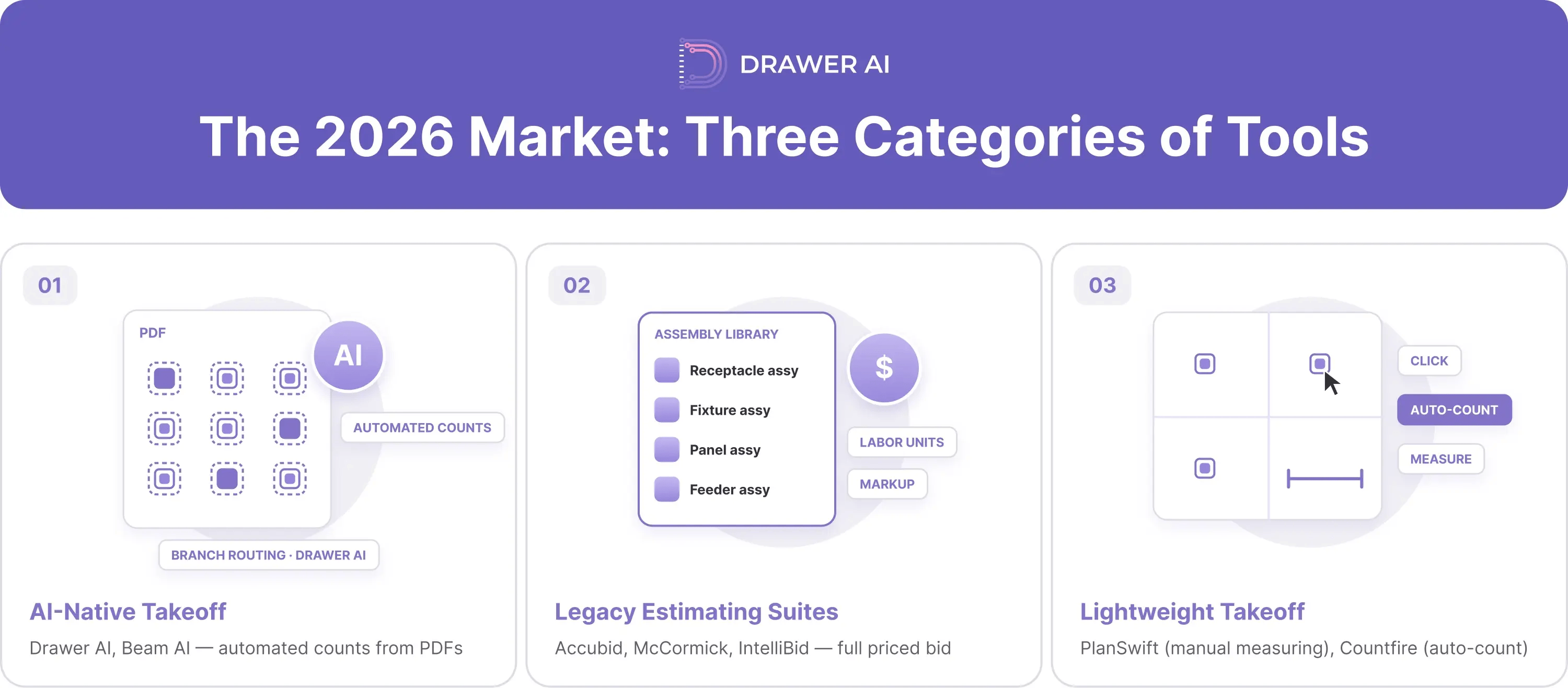
So, the right question is not "which software is best?" It is "which category fits my shop, and which tool in it?" Below, we score seven tools against one consistent rubric, summarize what verified reviewers report about each, and finish with a decision framework by shop size.
Disclosure: This article is published by Drawer AI. We've made every effort to evaluate competitors fairly using a consistent rubric. Where we believe Drawer is strongest, we say so, and where competitors are stronger, we say that too. Our goal is for this guide to be useful even if you don't pick us.
Every tool in this guide was assessed against the same seven criteria. We applied them in the same order, with the same questions, to Drawer AI and to every competitor.
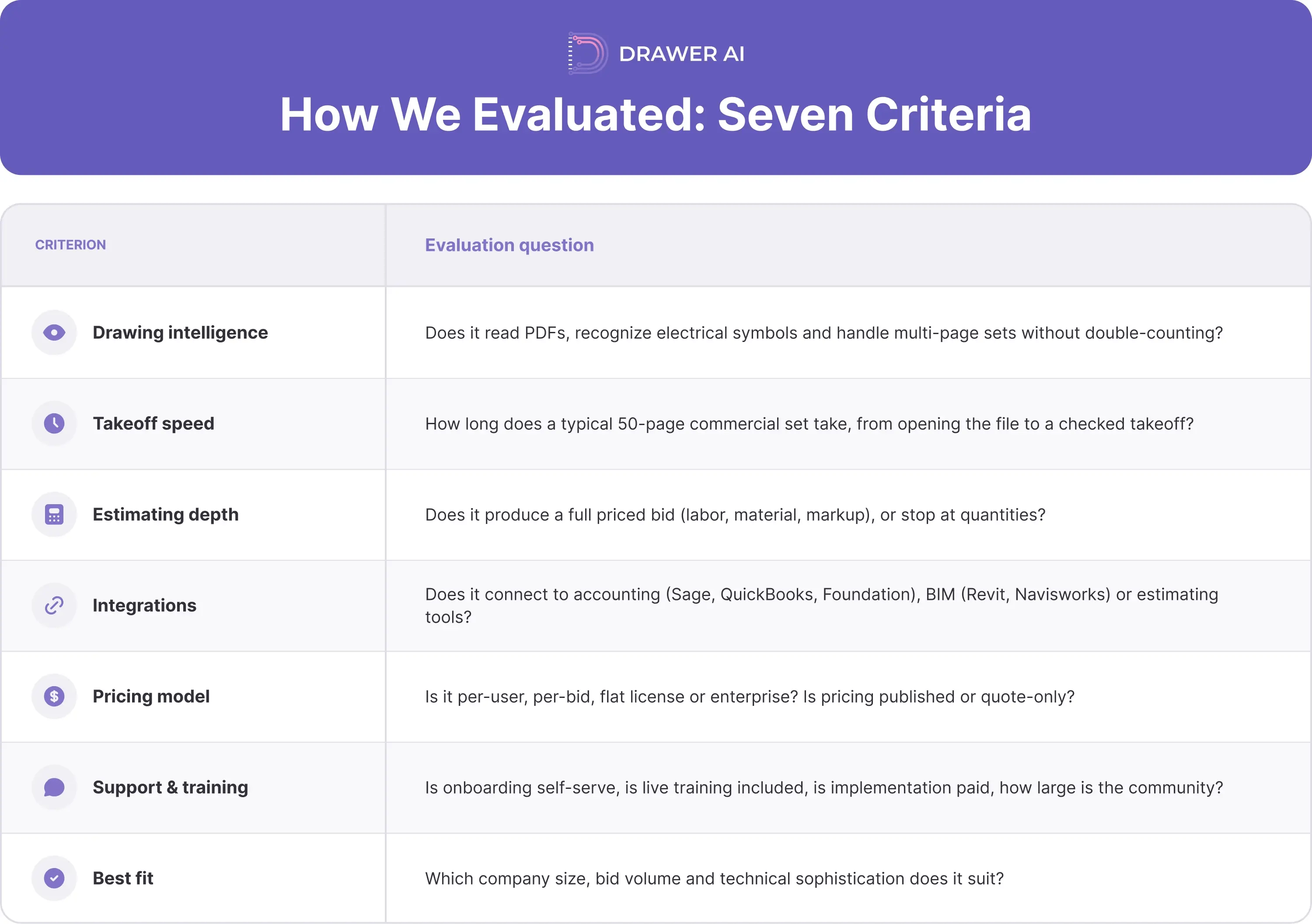
Two ground rules apply to every review below. First, the "What reviewers say" block for each tool comes from third-party review sites (G2 or Capterra). We pull one strength and one limitation from each so the read is balanced. We report what reviewers say rather than ranking tools on star ratings, because review counts across these products range from a handful to several hundred and are not comparable. Second, we do not state any tool's weaknesses in our own voice, including Drawer's. Where a tool has little public review data, we say so rather than invent criticism.
Pricing changes often, and most vendors in this category sell by quote. Where a vendor publishes a price, we link to it. Otherwise, we give a directional range with its source and date. Confirm current pricing directly with each vendor before you buy.
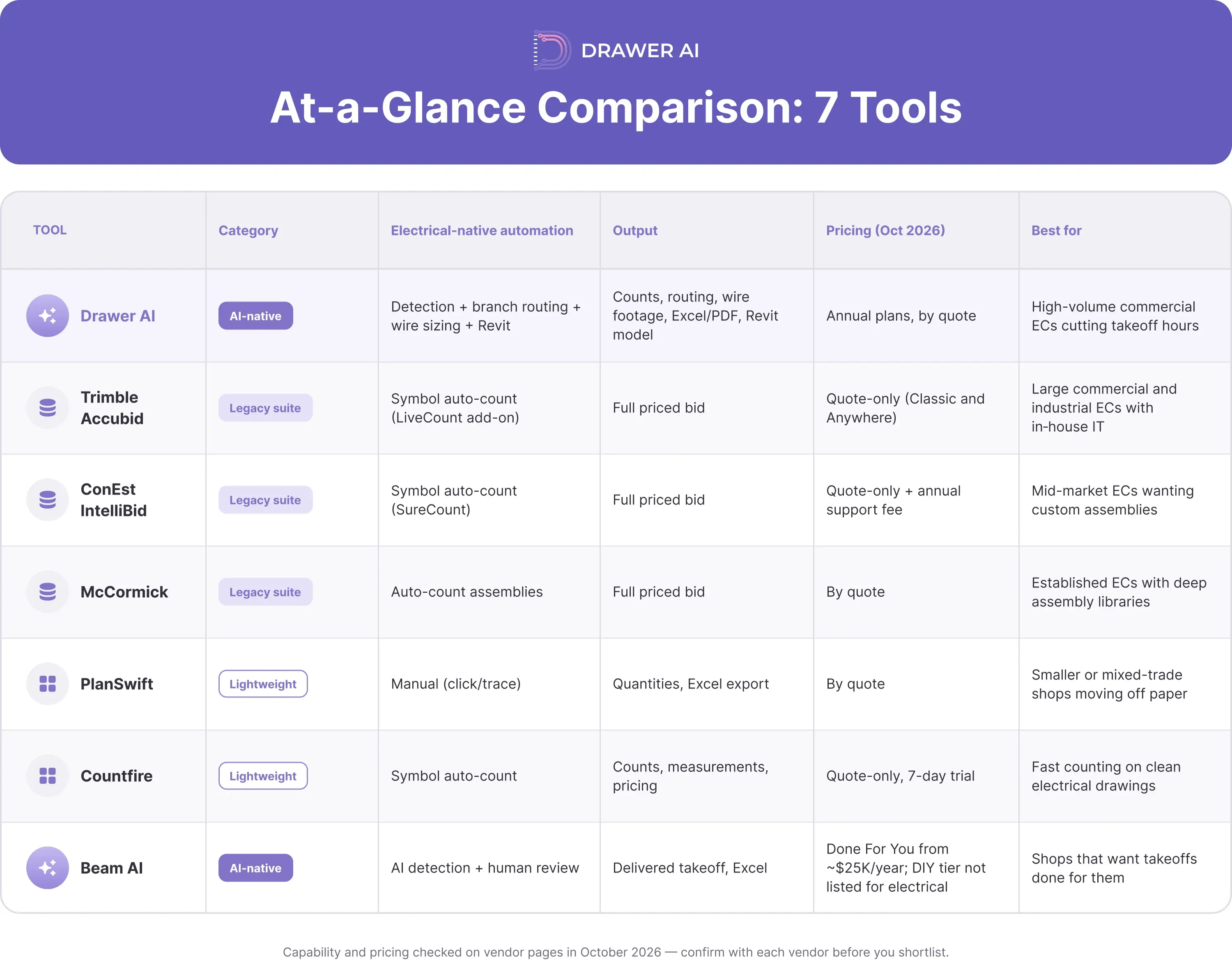
Capability and pricing were checked on vendor pages in October 2026 and will change. Confirm current pricing and features with each vendor before you shortlist.
At a glance. Drawer AI is takeoff software built only for electrical contractors. It reads PDF drawings, detects power devices, lighting fixtures, and panel schedules, and links each device to its panel and circuit. Beyond counts, it generates branch routing from each panel to every device, sizes wire with voltage drops and derating calculations, and stitches multi-sheet floor plans so overlapping sheets are not double-counted. Its BIM Wizard converts 2D drawings into native Revit models. Output is an Excel report (quantities, device properties, wire lengths) plus a marked-up PDF.
Best for. Commercial and industrial electrical contractors bidding enough work that takeoff hours are the bottleneck. Drawer reports more than 300 electrical contractors in the US and Canada as users.
How it works. You upload the drawing set. Drawer reads the symbol legend, detects devices across every sheet, and groups circuits from the panel schedules. The estimator reviews detections in the Takeoff Pad and QA tools, then exports quantities and wire footage into the estimating or pricing system the shop already uses.
Where Drawer is strongest (verifiable facts). In the Starr Electric case study, on an eight-floor, 300,000 sq ft cancer center, Drawer detected 6,645 symbols (3,284 fixtures and 3,361 receptacles). Total takeoff time was about 5.5 hours, against about 23 hours for the traditional method. That is a 76% reduction.
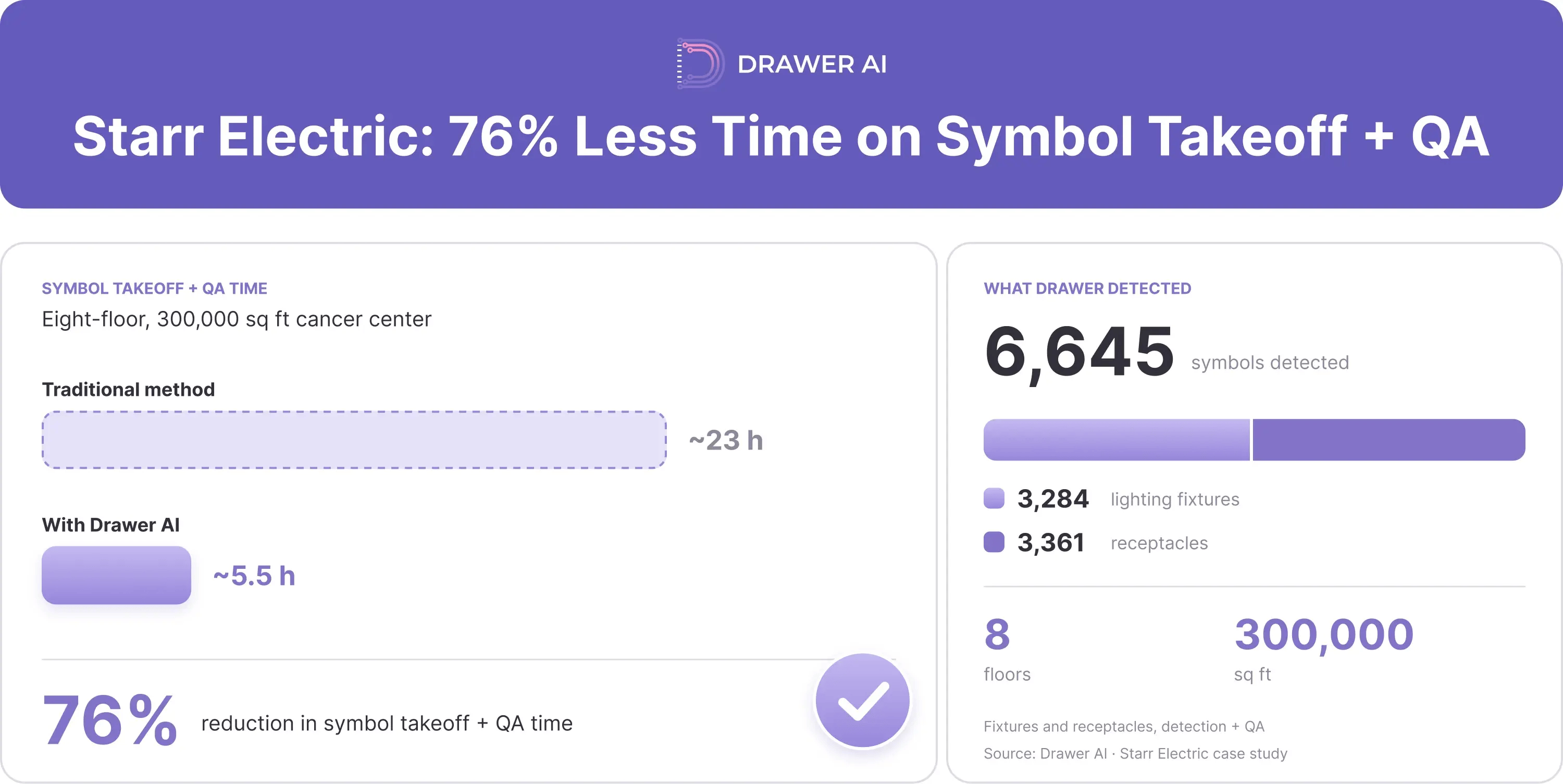
Scope limits (product facts). Drawer is a takeoff layer, not a full estimating suite. It does not apply labor units, price material, or produce the final bid number. Plan to pair it with an estimating suite or your own pricing workbook.
Field evidence. Drawer is newer to public review sites than the legacy suites, so there is not yet a large third-party review base. The strongest external signal is results on real projects: in the Starr Electric case study, Drawer cut takeoff time by 76% on a 300,000 sq ft cancer center, and the company reports 300+ electrical contractors across the US and Canada. Ask for references from shops your size before you buy.
Pricing. Drawer sells two annual plans, Starter and Enterprise, priced by team size and project volume (pricing page, as of October 2026). Prices are by quote. Onboarding and training are included, and both plans carry a 30-day money-back guarantee.
At a glance. Trimble Accubid is a full estimating suite for electrical contractors. It ships in two forms: Accubid Classic, the long-running desktop product, and Accubid Anywhere, the cloud version, which Trimble positions for commercial electrical, ICT (low voltage), and industrial mechanical contractors. Both cover takeoff, assemblies, labor, material pricing, and bid summary in one system.
Best for. Large commercial and industrial electrical contractors with multiple estimators, established assembly databases, and the internal capacity to manage an implementation.
How it works. The estimator builds the takeoff on screen against a database of items and assemblies, each carrying labor units and material cost. The suite rolls those quantities into labor hours, material totals, and markup, then produces the bid. Supplier price files can be imported to keep material costs current. Classic’s newer LiveCount tool adds AI-powered symbol auto-count on the Hosted subscription, so detection is no longer manual-only, though routing and wire sizing remain outside the suite.
What reviewers say. On Capterra (as of October 2026), Accubid Anywhere reviewers most often praise its multi-user live access, audit trails, and supplier pricing import. The most common criticism is a steep learning curve for assemblies and database setup, along with reports of slow performance and bugs in the newer version. Some reviewers also say databases from earlier Accubid versions could not be carried over.
Pricing. Trimble sells Accubid by quote; Trimble does not publish a price, and real costs depend on modules, seats, and support. Budget for implementation and training time as well as license cost.
At a glance. ConEst IntelliBid is an electrical estimating suite with a large item database, prebuilt assemblies, customizable labor rates, and automatic labor calculation. It includes its own on-screen takeoff tool, SureCount, which counts repeated symbols automatically, and connects to distributor pricing through Nettrice.
Best for. Mid-sized commercial electrical contractors that want full bid generation and are willing to invest setup time to tailor assemblies and labor to their own methods.
How it works. Estimators take off devices and run, then IntelliBid applies assemblies, labor units, and current material pricing to build the estimate. Reviewers note NEC-based item substitution, so wire and conduit sizes can be swapped without rebuilding the takeoff. The output is a formatted bid and supporting reports.
What reviewers say. On Capterra (as of October 2026), IntelliBid reviewers most often praise responsive support and the ability to customize assemblies and labor rates. The most common criticism is the learning curve and setup time, with several reviewers also objecting to annual support fees and the cost of adding licenses. Note that these reviews span 2012 to 2026, so older comments may not reflect the current release.
Pricing. ConEst sells IntelliBid by quote, with an annual support and upgrade fee on top of the license (per Capterra reviewers, as of October 2026). Shoppers comparing it to Electrical Bid Manager should know that EBM is a separate product from a different vendor. We cover the Electrical Bid Manager cost question in the FAQ below.
At a glance. McCormick Electrical Estimating, now part of Foundation Software, has been on the market for more than 45 years. It combines digital takeoff with a large library of prebuilt assemblies and materials, customizable menus and databases, and bid summary reporting. For shops already running Foundation for accounting, it sits inside the same vendor family.
Best for. Established commercial electrical contractors that have built, or want to build, deep custom assemblies and want a long-standing platform with a large user base.
How it works. The estimator takes off on screen using McCormick's assemblies, each tied to material and labor. Quantities flow into extensions and a bid summary, where markup, overhead, and labor rates are applied. Databases and menus can be customized to match the shop's standards.
What reviewers say. On Capterra (as of October 2026), reviewers most often praise the customizable assemblies and the large prebuilt library. The most common criticism is the learning curve for new users, with some also wishing database search were easier.
Pricing. McCormick sells by quote: its site lists no price and directs buyers to request a demo. A Capterra listing notes a free trial and multi-user discounts (as of October 2026). Module selection and support terms drive the final quote.
At a glance. PlanSwift is a general-purpose digital takeoff tool, owned by ConstructConnect since 2018. It measures counts, linear footage, and areas on PDF plans, supports custom assemblies and templates, and exports to Excel. It serves many trades, electrical among them, and integrates with Electrical Bid Manager.
Best for. Smaller electrical shops, or mixed-trade contractors, moving from paper or spreadsheets to digital takeoff without committing to a full estimating suite.
How it works. The estimator drags parts or assemblies onto the drawing and clicks each device or traces each run. PlanSwift totals the quantities, which can be priced inside its templates or exported to Excel. Symbol counting is manual; there is no automated detection.
What reviewers say. On Capterra (as of October 2026), PlanSwift reviewers most often praise its ease of use, Excel integration, and value. The most common criticism is that it lacks some advanced features found in other takeoff and bid management tools, and that initial setup is harder because built-in pricing is limited.
Pricing. PlanSwift sells by quote through ConstructConnect, with a free trial; older perpetual licenses have moved to an annual subscription. Confirm the current price and terms with ConstructConnect before purchase.
At a glance. Countfire is cloud-based takeoff and estimating software for electrical and mechanical contractors. It automatically counts symbols across drawings, can split drawings into zones, adds linear and area measurement, and includes check sheets to verify quantities before pricing.
Best for. Electrical contractors whose bottleneck is counting fixtures and devices on clean, well-drawn sets, and who want takeoff and pricing in one lightweight platform.
How it works. You upload drawings and select a symbol. Countfire finds matching symbols across the selected sheets, and the estimator confirms counts using the built-in checklist. Quantities can be priced in the platform or exported to Excel.
What reviewers say. On Capterra (as of October 2026), Countfire reviewers most often praise how much faster and more consistent counts are than manual methods. The most common criticism is that complex, low-quality, or oversized PDFs can load slowly or cause symbol-recognition problems that force manual counts. Capterra notes that many of these reviews were vendor-referred with an incentive.
Pricing. Countfire sells Pro and Business editions by quote, with a 7-day free trial (Capterra, as of October 2026). Business adds Dropbox and OneDrive integration, CSV export, SSO, and a dedicated product specialist.
At a glance. Beam AI, from Attentive.ai, offers AI takeoff two ways: a self-serve “Do It Yourself” license and a “Done For You” service where an expert estimator reviews the output. You submit plans and scope; Beam's AI extracts quantities, an expert estimator reviews the output, and the finished takeoff is delivered as a custom Excel export. It also flags changes across addenda and supports resubmission.
Best for. Contractors who want takeoffs done for them, with a human check, and who can work with a delivery window rather than same-day turnaround.
How it works. Upload PDFs and spec sheets and define the scope. Beam states that completed takeoffs arrive in 24 to 72 hours, within ±1% of in-house accuracy. Those figures are the vendor's claims, not independent measurements.
What reviewers say. On Capterra (as of October 2026), Beam AI reviewers most often praise the time it frees up for estimators and the responsiveness of support. The most common criticism is missed items or quantity errors on some takeoffs, and some reviewers report turnaround slower than the advertised window. Most reviewers say they still check the output before bidding.
Pricing. Beam sells a fixed annual license tied to trade and annual bid volume, not per-use. It publishes entry points: Do It Yourself from about $8,000 per trade, Done For You from about $25,000, with Enterprise by quote (pricing page, as of October 2026). No free trial.
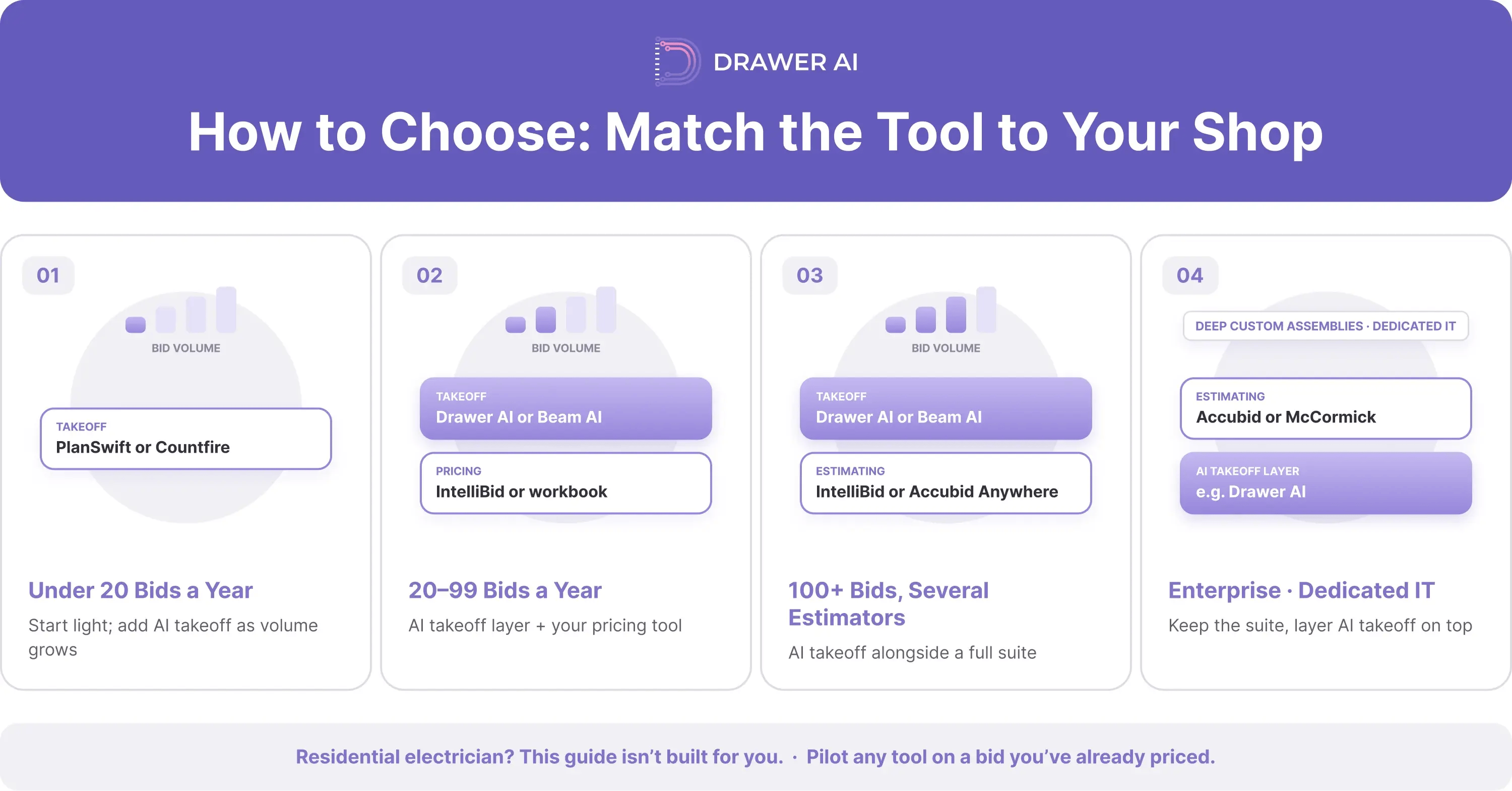
Start with two numbers: how many commercial bids you submit per year, and how many estimators you have. Those two figures decide which category fits. The tool inside the category comes second.
Fewer than 20 commercial bids a year, mostly spreadsheets. Start with PlanSwift or Countfire. PlanSwift gives you general-purpose measuring at a lower entry cost. Countfire adds automated symbol counting if fixtures and devices are your main time sink. Add an AI takeoff tool such as Drawer or Beam when bid volume justifies the subscription.
20 to 100 commercial bids a year, and you want estimator hours back. Put Drawer AI or Beam AI on the takeoff layer. Choose Drawer if you want to run takeoffs in-house the same day, with branch routing and wire footage. Choose Beam if you would rather hand takeoffs off and receive them back. Pair either with ConEst IntelliBid or your existing pricing workbook for bid generation.
100 or more bids a year, with multiple estimators. Run Drawer or Beam for takeoff alongside a full suite, such as ConEst IntelliBid or Accubid Anywhere, for estimating depth. You cut time on the slowest step and keep the bid-generation layer your team already trusts. Check how quantities move between the two systems before you commit; an Excel handoff is workable, but test it on a live bid.
$50M-plus enterprise with deep custom assemblies and dedicated IT. Trimble Accubid and McCormick remain the established platforms for this profile. Layer AI takeoff, such as Drawer, on top to modernize takeoff without replacing years of assembly work.
Residential electrician. This guide is not built for you. Every tool here is evaluated on commercial and industrial work; look at residential-focused tools instead.
Whichever branch you land on, run a pilot on a bid you have already priced. Compare the tool's quantities and hours against your actual numbers. That single test will tell you more than any review, including this one.
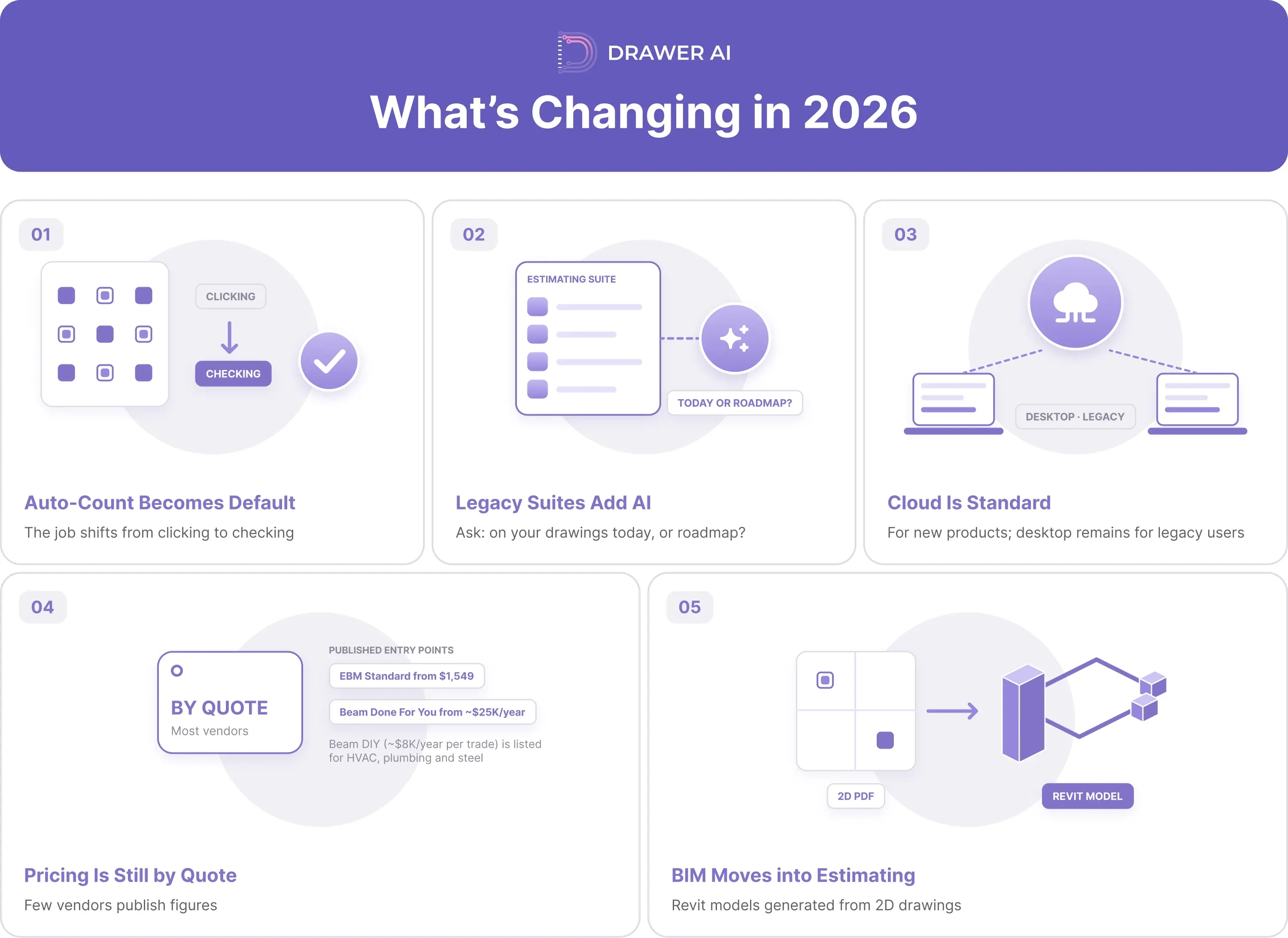
Five shifts are reshaping how commercial electrical estimating software is bought and used.
The right electrical estimating software depends on your shop, not on a ranking. Small shops get the most from lightweight takeoff. High-volume shops get the most from an AI takeoff layer. Large enterprises still lean on a legacy suite for estimating depth. Many commercial contractors now run two tools: one to count, one to price.
If takeoff hours are what limit how many jobs you can bid, test Drawer AI on a set you have already estimated. Compare its counts and hours against your own numbers. Book a demo with Drawer AI and bring a real drawing set.
All pages accessed October 2026.

14425 Falcon Head Blvd
Building E, Suite 100,
Austin, TX 78738
Created by Estimators, Powered by AI and Innovation
Copyright © 2026 Drawer AI. All rights reserved.