AI





Electrical estimating teams rarely consider the cloud because they want a lesson in cloud computing. They consider it because the current workflow has friction: a Windows-only installation, a license attached to a specific machine, different software versions between offices, an update that needs IT involvement, or project files that are hard to reach when an estimator is working remotely.
Table of Сontents
That makes the real question practical. If you move to cloud based electrical estimating software, what changes in the day-to-day estimating workflow, and what do you give up in return?
The answer is not that cloud automatically wins. A mature desktop estimating system may already hold years of company-specific labor units, assemblies, pricing structures, vendor information, and bid history. Replacing that foundation simply to gain browser access can create more disruption than value. For many commercial and industrial electrical contractors, the better answer is a mixed stack: keep the system that prices work well, and add cloud tools where access, takeoff, review, or collaboration are the bottleneck.
For an estimating department, “cloud-based” describes how the software is delivered and where the working data lives, not how modern the interface looks.
Some cloud-based electrical estimating tools are browser-native: the estimator signs in, opens a project, and works without maintaining a traditional local application. Other products are established Windows applications delivered through hosted infrastructure, so the experience still looks like desktop software even though access is remote.
That distinction matters. “Cloud” does not automatically mean Mac support, mobile usability, real-time co-editing, offline access, or zero setup. Those capabilities depend on the product. The practical shift is that the project is no longer assumed to belong to one workstation. An estimator in another office can access the same system without emailing project files back and forth, subject to the vendor’s licensing and permission model.
Moving electrical estimating software online changes several operational details that matter on bid day.
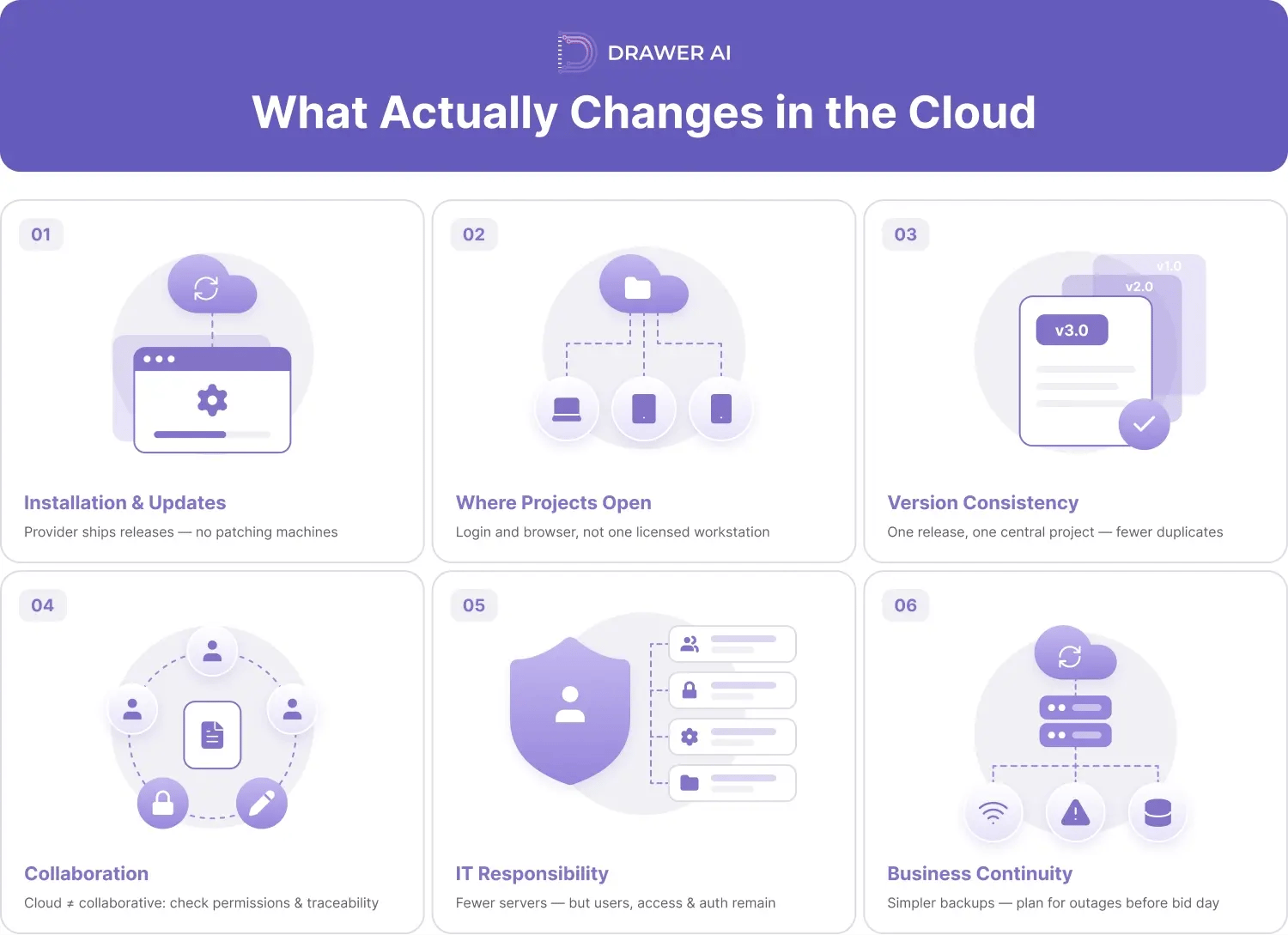
Installation and updates. With a browser-native product, the provider manages application releases instead of the contractor patching individual estimating machines. A hosted desktop product can also reduce local infrastructure while preserving a familiar Windows interface.
Where projects are opened. A local workflow often assumes the estimator is on the licensed workstation, connected to the right network drive, or using remote access. A cloud workflow usually shifts access to a login, an internet connection, and a supported browser or device.
Version consistency. Centrally delivered software reduces the chance that different estimators are running different releases. Centrally stored projects also reduce duplicate files on laptops, shared folders, and email.
Collaboration. Cloud access can simplify handoffs, but “cloud” and “collaborative” are not synonyms. Ask whether multiple estimators can work in one project, whether permissions differ by role, and whether changes are traceable. A shared login is not a collaboration feature.
IT responsibility. The contractor may manage fewer servers and installations, but still has to manage users, permissions, authentication, browser compatibility, and vendor access. The IT burden changes; it does not disappear.
Business continuity. Central hosting can simplify backup and recovery, but it also creates dependence on internet access and service availability. Know the contingency process before a bid deadline exposes it.
The strongest argument for online electrical estimating software is convenience. The strongest argument for keeping desktop is control and accumulated estimating intelligence.
A desktop system tuned over years may contain assemblies for recurring branch work, labor factors, preferred material descriptions, vendor pricing logic, alternates, breakout structures, and proposal formats. Those are not generic records; they are part of how the company bids.
A cloud takeoff platform can be excellent at drawing access, quantity extraction, or review and still be the wrong place to rebuild that database. Before replacing anything, separate the takeoff layer from the pricing layer. Decide which system remains the source of truth for labor, material pricing, assemblies, quotations, markups, and the final bid.
You may also give up some control over update timing. A locally managed application can often stay on a known version until the team upgrades, while a web service changes as the provider releases updates. Cloud workflows also depend on connectivity and vendor data practices. If the company needs a specific hosting region, retention policy, backup requirement, single sign-on method, or data-control language, verify it before rollout.
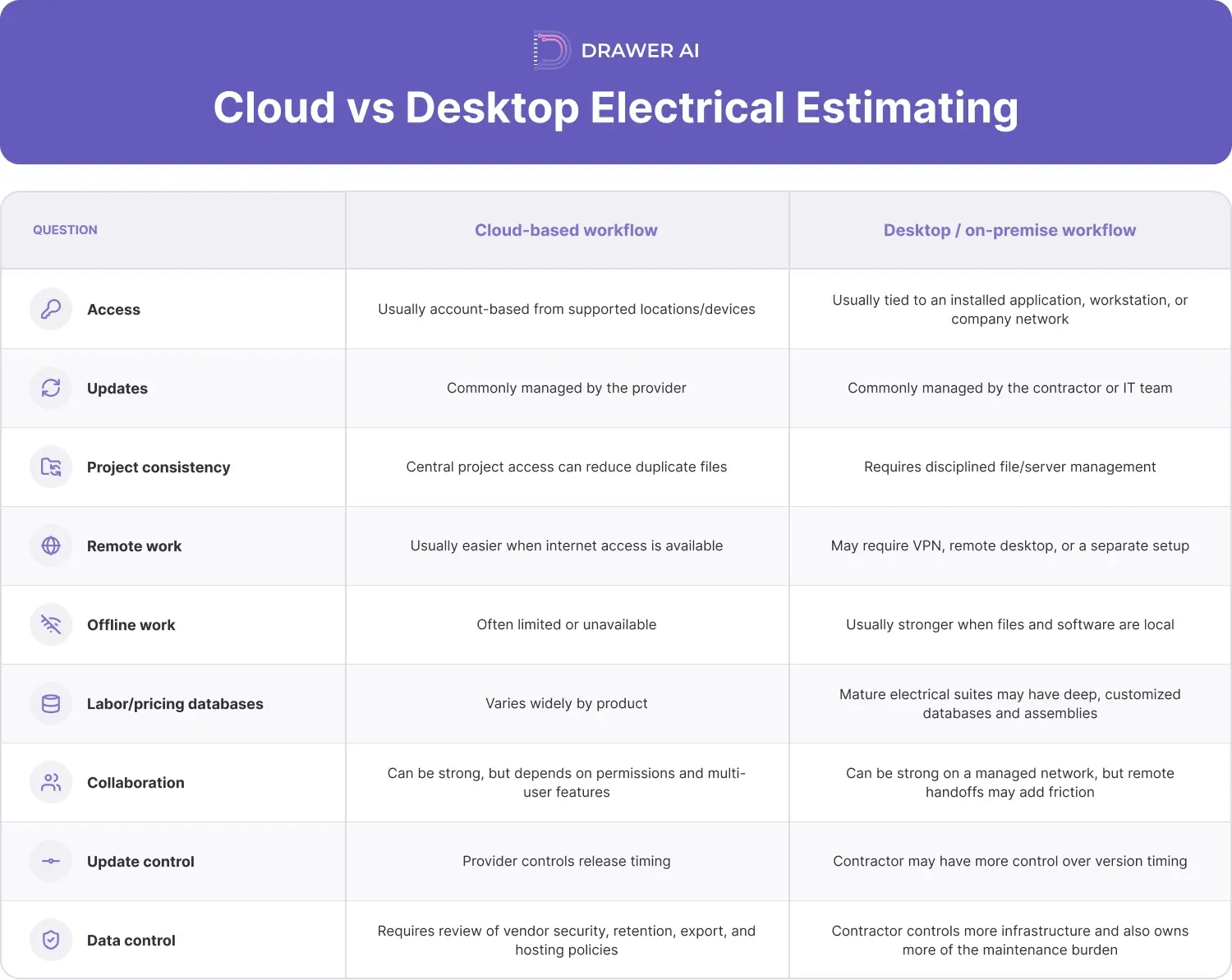
The useful comparison is not “new versus old.” It is which deployment model creates less friction around the work your estimators actually do. The following cloud vs desktop estimating software comparison is a starting point, not a universal rule.
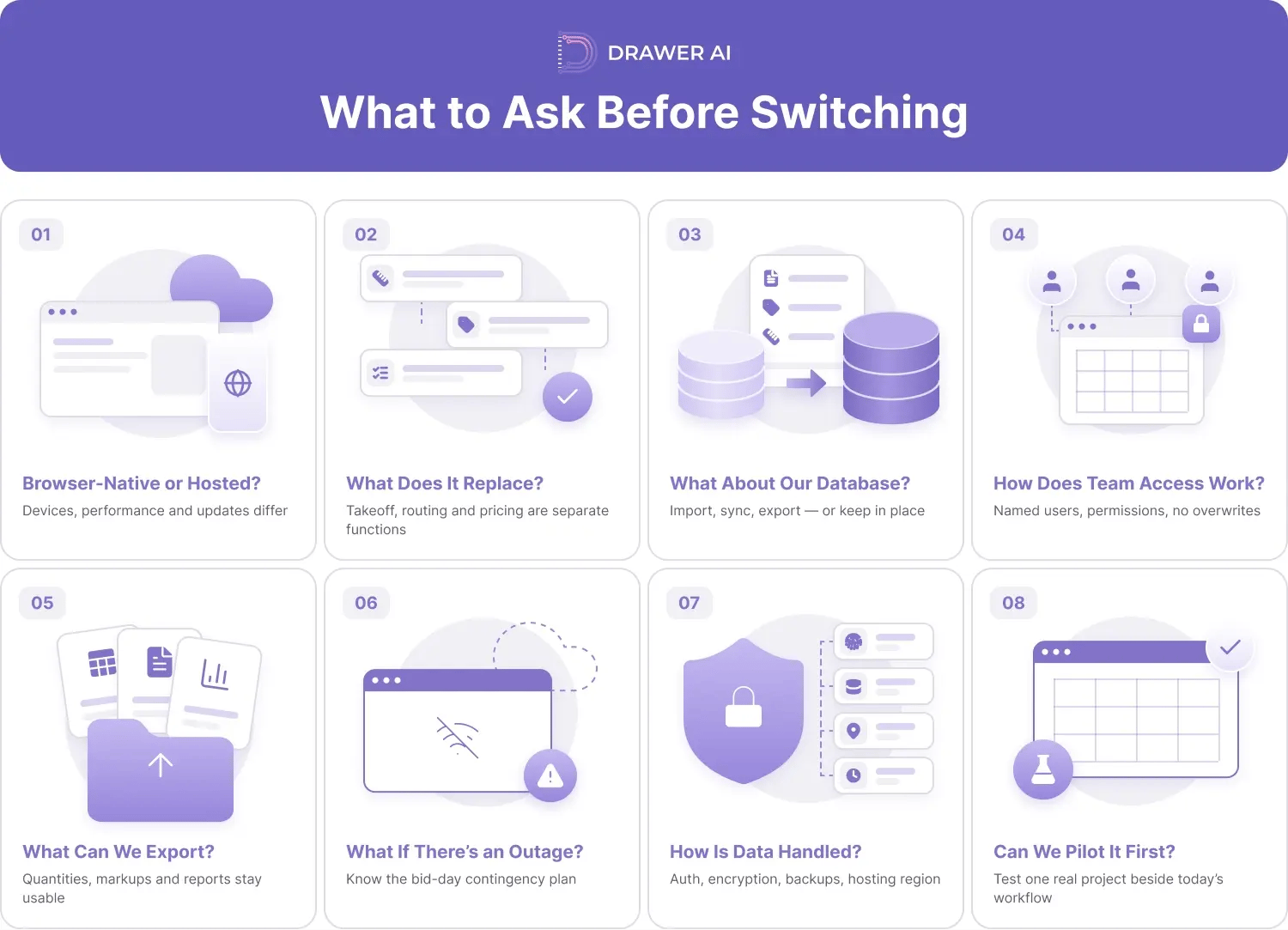
A switch should begin with workflow questions, not a feature checklist. Before adopting web-based electrical takeoff software or moving an estimating suite into the cloud, ask:
1. Is it browser-native or a hosted desktop application? Device support, performance, updates, and user experience can differ.
2. Which part of estimating does it replace? Counts, measurements, routing, labor extensions, material pricing, assemblies, proposals, and bid recap are separate functions.
3. What happens to our existing database? Confirm whether labor units, assemblies, historical estimates, custom items, and price files can be imported, synchronized, exported, or must stay in the current system.
4. How does team access work? Check named users, concurrent access, permissions, project ownership, offboarding, and whether estimators can work without overwriting each other.
5. What can we export? Quantities, markups, reports, and historical data should remain usable outside the platform when needed.
6. What happens during an outage? Know the offline, export, status, or contingency process for bid-day interruptions.
7. How is data handled? Ask about authentication, encryption, backups, hosting region, retention, deletion, and disaster recovery.
8. Can we pilot it without rebuilding the stack? Test one real commercial or industrial project beside the current workflow and measure setup, review, quantity transfer, and bid closeout.
If your team is evaluating cloud-based electrical estimating workflows, that last question matters. A tool can create value without becoming the system that does everything.
For a contractor comparing cloud based electrical estimating software with a desktop suite, the decision therefore does not have to be a full migration. Keep the estimating engine that holds your company knowledge and use a browser-based layer where manual PDF takeoff and routing are consuming estimator hours.
At Drawer AI, we're the web-based takeoff and branch-routing layer of that mixed stack. You upload your PDF drawings, and our app detects lighting fixtures and power devices, extracts and links schedule information, groups circuits, generates branch routing, and applies wire sizing, voltage drop, and derating. You review the results with built-in QA tools and export clean quantities to Excel and marked-up PDFs.
Those quantities flow straight into the pricing system you already trust. Drawer AI takes on the manual PDF takeoff and routing that eats estimator hours, then feeds your labor-unit database, assemblies, and supplier-pricing workflow exactly what they need to build the bid. Your estimating engine stays the source of truth; we just get it there faster.
Want to see it on your own work? Run the workflow on a live drawing set, compare the exported quantities against your current process, and keep your estimating stack in place. Book a demo.

14425 Falcon Head Blvd
Building E, Suite 100,
Austin, TX 78738
Created by Estimators, Powered by AI and Innovation
Copyright © 2026 Drawer AI. All rights reserved.