




AI
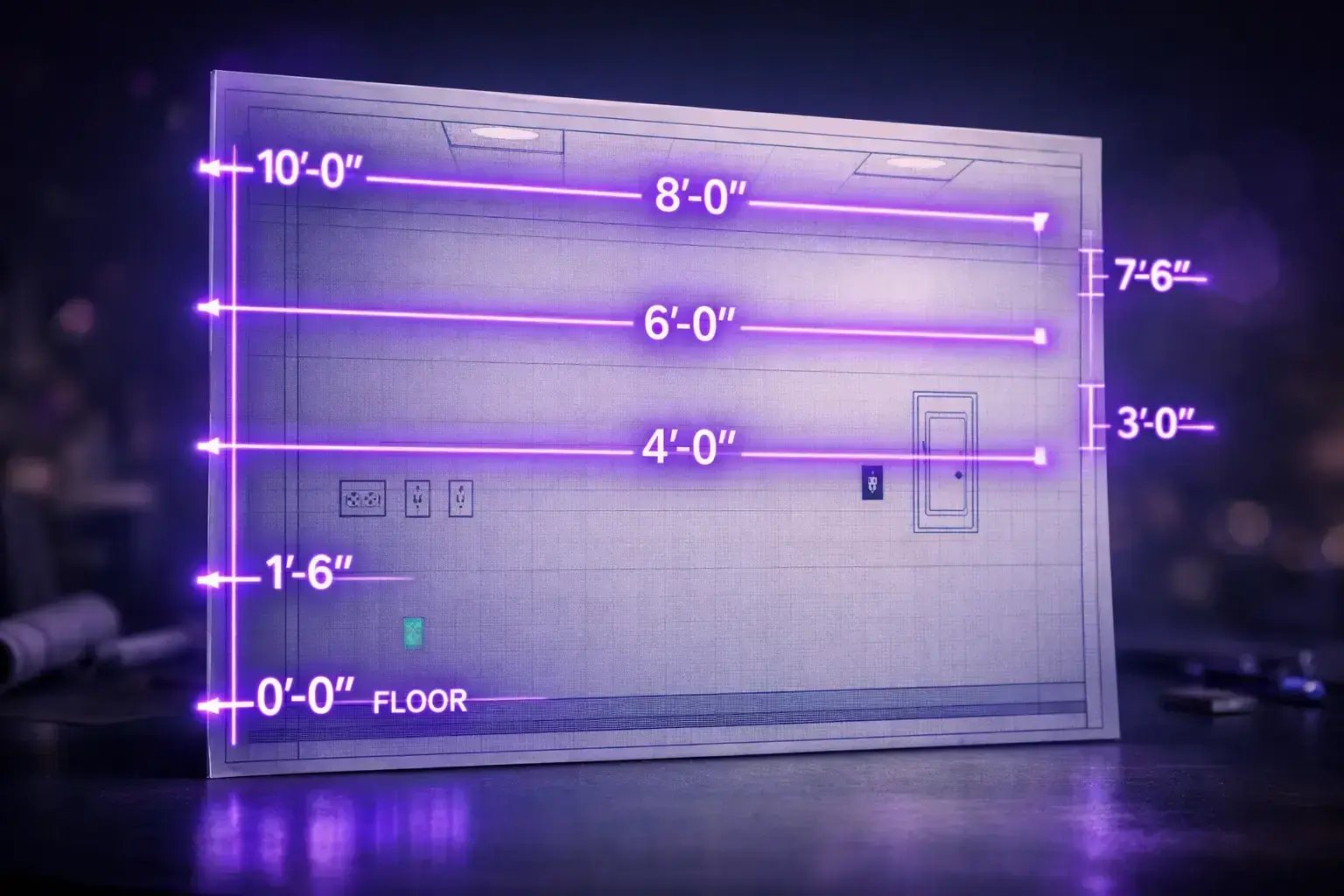
Elevation drawings are a fundamental part of the commercial construction process, providing critical visual information that supports both electrical and project teams. These drawings represent vertical views of a structure's surfaces, such as walls and facades, allowing teams to see the placement of various components in relation to architectural features, heights, and spatial relationships. This level of detail is essential for accurately planning and installing electrical systems, as it enables teams to coordinate with other trades and avoid costly mistakes.
Table of Сontents
For electrical teams, elevation drawings help ensure that outlets, switches, lighting fixtures, and other electrical elements are properly located according to both code requirements and design intent. Project teams rely on these drawings to confirm that all systems align with the overall construction plan and to identify potential conflicts early in the process. By using elevation drawings, teams can streamline communication, improve accuracy, and ultimately deliver successful commercial construction projects on time and within budget.
In architecture, an elevation refers to a scaled drawing that shows a vertical view of a structure, typically depicting one side of a building. These drawings illustrate the appearance, dimensions, and arrangement of architectural features such as windows, doors, and façade elements. Elevations are essential for visualizing how a building will look from different perspectives and for communicating design intent to project stakeholders.
In the context of construction, an elevation is a technical drawing that provides a vertical representation of a building’s surfaces or interior walls. These drawings are used to show the placement of elements such as electrical fixtures and outlets, and to convey important information about heights and spatial relationships. Elevation drawings help construction teams coordinate the installation of different systems and ensure that all components are correctly positioned according to the project plan.
The terms architecture elevation drawing, architectural elevations, and architecture elevations are often used broadly to describe any elevation drawings created during the design and construction phases. These umbrella terms encompass exterior and interior elevations, helping teams visualize and coordinate every aspect of a building’s design and construction.
In architectural and construction drawings, both plan views and elevation views are essential for conveying the complete design intent of a project. These two types of drawings provide complementary perspectives that, when used together, give a comprehensive understanding of a building's layout, structure, and appearance.
A plan view is a horizontal "bird’s eye" representation that shows the layout of spaces within a building as seen from above. It illustrates the arrangement of rooms, walls, doors, and windows on a particular floor, making it easier to understand the spatial organization and the relationships between different areas. Plan views are critical for planning circulation, access, and how spaces connect to one another.
An elevation view, in contrast, provides a vertical depiction of a building’s exterior or interior surfaces. It shows the appearance and height of architectural elements such as façades, windows, and doors. Elevation drawings are important for visualizing how the building will look from various sides and for detailing the placement of features and finishes.
Together, plan and elevation views allow architects, engineers, and stakeholders to understand both the functional arrangement and the visual aspects of a project. Plan views clarify the internal layout, while elevation views provide details about the external and internal appearance. This collaboration ensures that all aspects of the design are coordinated and accurately communicated.
A plan view is a top-down drawing that shows the arrangement of spaces in a building, while an elevation view is a vertical drawing that depicts one side of the structure. Plan views help understand the floor layout and spatial relationships, whereas elevation views illustrate the vertical aspects, such as heights and the appearance of walls and façades. Using both views together provides a complete picture of the design, aiding in visualization and accurate construction.
Elevation drawings are essential for electrical planning and installation, as they provide critical information for the placement and coordination of electrical systems within a building. The following sections break down key elements of elevation drawings that directly impact electrical work.
Elevation symbols and callouts are graphical references used in plans to indicate specific elevation views. These symbols help electrical teams locate the exact walls or surfaces where devices, fixtures, or electrical panels will be installed. By referencing these callouts, electricians can ensure their work aligns with the intended architectural design and spatial arrangement.
Datum lines and levels mark important vertical measurements in elevation drawings, such as the finished floor, ceiling heights, bulkheads, and soffits. For electrical installations, these references are crucial for determining where devices and fixtures should be mounted. Accurate knowledge of datum lines ensures that outlets, switches, and luminaires are installed at the correct heights and positions.
Elevation drawings specify the dimensions and heights for mounting devices, luminaires, and signage bands. These measurements guide electricians on how high to place electrical boxes, conduits, and lighting fixtures. Consistent adherence to these dimensions is necessary for both safety and compliance with building codes.
The materials and finishes detailed in elevation drawings affect the selection of box types, supports, and installation methods. For example, different wall finishes may require specific mounting hardware or boxes. Understanding these details allows electricians to choose appropriate products and techniques, resulting in durable and aesthetically pleasing installations.
Annotations and tags in elevation drawings provide cross-references to schedules, such as lighting, device, and finish schedules. These notes help electricians identify which devices are required in each location and ensure that all components are coordinated with other trades. Clear tagging streamlines the installation process and minimizes errors.
The elements described above directly influence box and conduit placement, as well as coordination with casework, glazing, doors, and equipment. By carefully reviewing elevation drawings, electricians can avoid conflicts with architectural features, ensure proper alignment with cabinetry and windows, and accommodate equipment requirements. This coordination is vital for achieving a seamless and functional electrical system within the building.
Elevation drawings play a critical role in commercial electrical and estimating workflows. They provide essential visual context for device layouts, lighting placement, equipment and panel locations, and façade or building elevation design. Using elevation drawings in these scenarios helps prevent common installation issues and streamlines project execution.
Interior elevation drawings detail the precise placement and heights of electrical devices such as outlets, switches, and control panels. By referring to these elevations, electricians can ensure that devices are not mounted in conflict with casework, glazing, or signage. Accurate device layouts prevent mounting at incorrect heights and minimize the risk of costly rework due to visual or architectural objections.
Lighting elevations specify the locations and mounting heights for luminaires, sconces, and signage bands. These detailed drawings guide installers to position lighting fixtures consistently and in alignment with architectural features. By using elevation drawings, electricians avoid clashes with cabinetry, windows, and other built elements, and ensure lighting is both functional and visually harmonious.
Elevation drawings for electrical equipment and panels provide clear information on where to install panels, disconnects, and specialty devices relative to walls, doors, and adjacent equipment. This clarity helps avoid conflicts with architectural components such as casework or glazing and ensures equipment is accessible and compliant with code-specified mounting heights. Early coordination with elevation drawings reduces the likelihood of rework due to placement objections.
Façade or exterior elevation drawings are essential for locating exterior lighting, signage, and building-mounted devices. These drawings illustrate the relationship between electrical components and architectural features, ensuring harmonious integration and code compliance. By following building elevation drawings, installers avoid clashes with exterior finishes or signage and maintain the architectural integrity of the façade, minimizing the potential for visual or aesthetic rework.
In each of these commercial-grade examples, utilizing building elevation drawings is key to avoiding clashes with casework, glazing, or signage; preventing mounting at incorrect heights; and reducing the need for rework due to visual or architectural objections.
Understanding architectural elevation drawings is crucial for project teams who may not have formal architectural training. These drawings are vital in commercial construction workflows because they provide visual context for device layouts, lighting placement, equipment and panel locations, as well as façade design. Elevation drawings help prevent installation errors, minimize rework, and ensure that electrical and architectural elements are properly coordinated within the building environment.
Digital models and PDFs have fundamentally transformed the workflow for elevation drawings. Rather than relying solely on manual markups and printed plans, teams now use digital tools to review, annotate, and coordinate elevation views. This shift streamlines communication, improves accuracy, and speeds up the review process. With digital workflows, changes are tracked more efficiently, and information can be shared instantly across teams, reducing the likelihood of errors or missed updates.
Elevation views in these digital formats serve several vital functions. They provide clear visualization of surface-mounted devices and wall fixtures, allowing teams to perform precise quantity takeoff. By seeing exactly where outlets, switches, lighting fixtures, and other devices are placed in relation to architectural features, estimators and project managers can quickly assess the scope of work. Additionally, digital elevation views help with change detection. When finishes or layouts are modified and devices are moved, these changes are easily identified and documented, ensuring that device placement remains compliant and coordinated with other trades.
Automated plan review technologies, such as Light Drawer AI, further enhance these workflows by highlighting devices on elevation drawings and flagging potential conflicts. These tools can automatically scan elevation views, identify areas where devices may interfere with casework, glazing, or other architectural elements, and alert teams to issues before they become costly rework. For those interested in exploring these benefits further, consider requesting pricing information or a demo to see how automated plan review can streamline your elevation drawing process.
Elevation drawings are essential for ensuring the accurate placement of devices and equipment in construction and renovation projects. However, several common mistakes can compromise the quality and effectiveness of these drawings. Understanding these pitfalls—and how to avoid them—can help teams maintain accuracy, prevent rework, and streamline coordination.
Use digital tools and workflows to track changes and share updates instantly among project teams.
In summary, avoiding common installation errors—such as neglecting elevation checks, misreading datum lines, overlooking finish changes, and missing scope on interior elevations—requires careful coordination and attention to detail. By implementing best practices like reviewing elevation drawings, verifying datum lines using the finished floor, coordinating with finish schedules, thoroughly checking interior elevation views, and leveraging digital tools, teams can significantly reduce costly corrections and project delays. Consistent adherence to these methods ensures that all devices, lighting, and signage are installed accurately and in compliance with project requirements.
If you’re seeking accurate pricing or wish to experience a demo of Drawer AI’s capabilities, reach out to our team today. Drawer AI is designed to streamline project workflows, enhance collaboration, and help you maintain precision throughout every phase of your project. Connect with us to learn how Drawer AI can support your team in achieving flawless installations and successful outcomes.
Elevations in construction are drawings that illustrate the vertical surfaces of structures or rooms, highlighting the location and mounting heights of elements such as doors, windows, devices, lighting, and signage. These drawings help ensure that everything is installed at the correct position relative to the finished floor.
Plan drawings show a horizontal view of a space as seen from above, typically illustrating the layout of walls, fixtures, and furniture. Elevation drawings, in contrast, display a vertical view of a wall or building face, highlighting the heights and arrangement of elements mounted on that surface.
Elevation drawings specify the exact mounting heights and locations of electrical devices like receptacles, switches, and panels. By referencing these drawings, installers can ensure that each device is positioned according to the design criteria and in compliance with project requirements.
To coordinate receptacles, switches, and panels, review the interior elevation views alongside the main plans. This process helps confirm that devices are located at the correct heights and positions and ensures alignment with other elements and finishes.
Digital tools and AI can analyze elevation drawings to automatically identify and quantify the devices shown, including their precise heights and locations. This capability helps streamline the takeoff process, reduces the risk of missing items, and facilitates more accurate project planning and installation.

14425 Falcon Head Blvd
Building E, Suite 100,
Austin, TX 78738
Created by Estimators, Powered by AI and Innovation
Copyright © 2026 Drawer AI. All rights reserved.