
AI





An electrical takeoff rarely fails on the first count; it falls behind when a new drawing issue changes fixtures, devices, panel assignments, or home runs and no one can tell which quantities are still valid. A controlled revision process compares each new issue with a frozen baseline, records the quantity delta, and updates only the affected scope instead of rebuilding the estimate.
Table of Сontents
For commercial electrical estimators, that means identifying the document that authorized the change, checking beyond revision clouds, and keeping drawing evidence attached to every adjustment – both before bid day and when project managers evaluate changes after award.
Design changes break electrical takeoffs when revised sheets arrive under deadline pressure and the team loses track of which quantities changed, which stayed, and why. The first takeoff may be organized by floor, system, and device type. Then an addendum arrives with replacement electrical sheets, a revised lighting schedule, and one sentence in a specification section. If someone overwrites the original quantities, the team loses the ability to distinguish the original bid from the revised scope. If someone ignores the update, the price may reflect drawings that are no longer current.
Four common problems compound the risk. Different estimators can be working from different PDF issues; additions and deletions get mixed into one total; material waste and allowances obscure the underlying count; and the bid deadline leaves little time for a proper second check. A small symbol change can affect several downstream quantities if it also changes circuiting, conduit, conductors, or installation labor.
These terms describe different pieces of the document-control process. An addendum modifies or clarifies the bidding documents while the job is out to bid, before bids are due. An architect’s supplemental instruction, or ASI, is generally used during construction for clarifications or minor changes that do not change the contract sum or time under AIA’s G710 form. “Bulletin” is less standardized: on one project it may be a pre-bid package; on another, a proposed post-award change. A revised sheet is a document version; on its own, it does not prove commercial authorization.
|
Document |
Typical timing / purpose |
Electrical takeoff action |
Commercial control |
|
Addendum |
Usually during bidding; changes or clarifies the bid documents. |
Recheck every referenced electrical sheet, schedule, and spec section before the bid. |
Acknowledge receipt and use the latest issued bid basis. |
|
Drawing bulletin |
Varies by project; may propose or package revisions before or after award. |
Identify exact affected sheets and measure the delta against the proper baseline. |
Confirm whether it is for pricing, information, or authorized work. |
|
ASI |
Generally during construction; instruction or minor change under the project’s contract framework. |
Check whether clarification changes quantities, methods, or material requirements. |
If it affects cost or time, check the contract’s notice requirements before proceeding. |
|
Revised drawing sheet |
Any formal reissue with a new date, number, or revision identifier. |
Compare old and new versions, then reconcile schedules and notes. |
Tie the sheet to its transmittal or change document; do not assume authorization. |
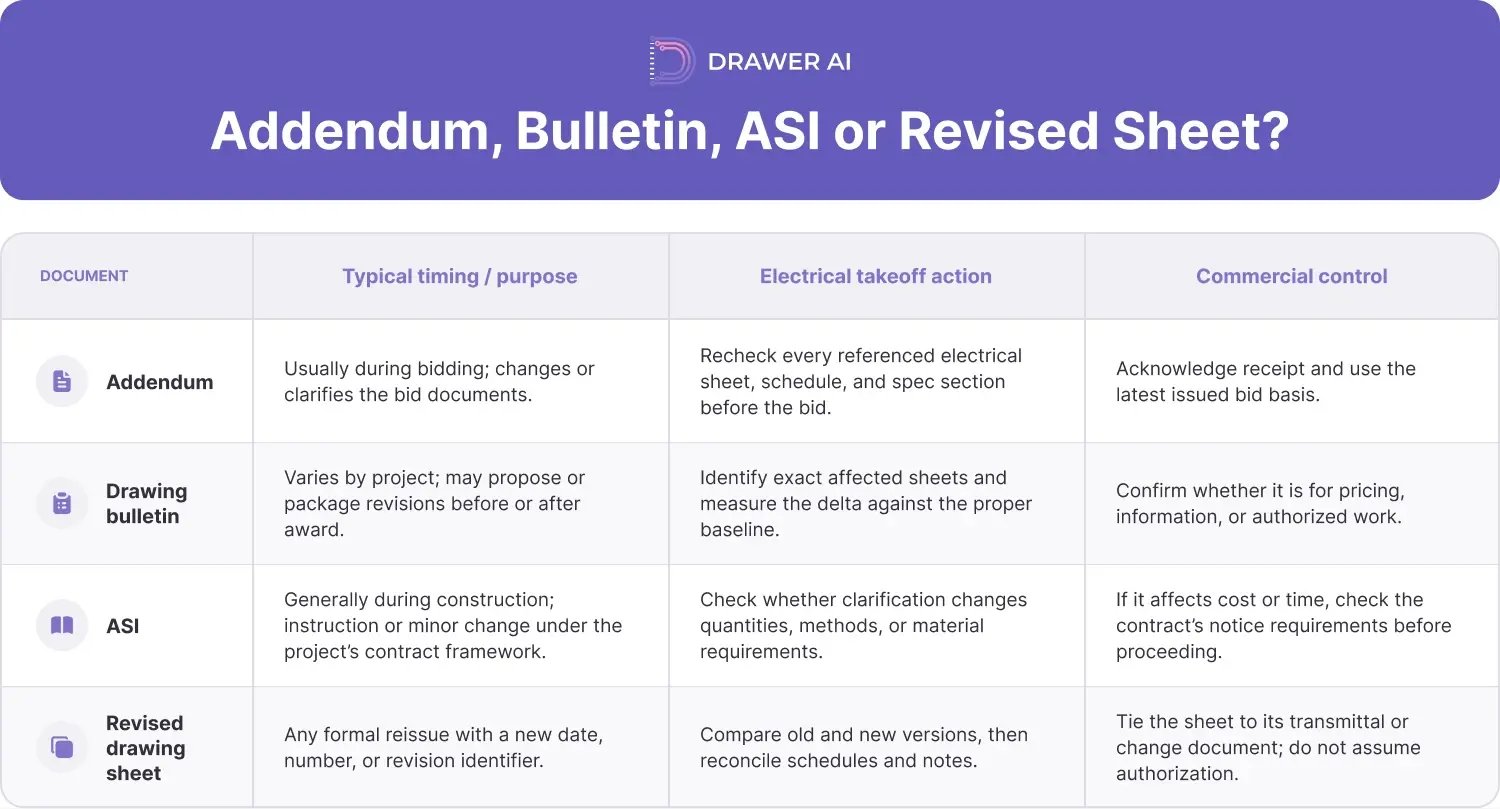
For definitions and project-specific procedures, rely on the contract and specification Division 01. AIA’s summary of A701 Instructions to Bidders explains when addenda are issued, while the AIA G710 guidance describes the intended use of ASIs. The package label should never replace that review.
Revision clouds are useful pointers, not a complete change inventory. A cloud may highlight one relocated receptacle while a lighting fixture schedule quietly changes the type of eight fixtures. A panel schedule can move circuits between panels without a matching cloud on the floor plan. General notes, equipment details, risers, and specifications may change even when the main electrical plan looks identical.
Clouds can also be incomplete, removed on subsequent issues, or affected by inconsistent drafting practices. An overlay comparison may show a moved symbol, but it does not tell you whether the device rating, installation requirement, or circuit assignment changed elsewhere. Treat a cloud as the starting point of the review.
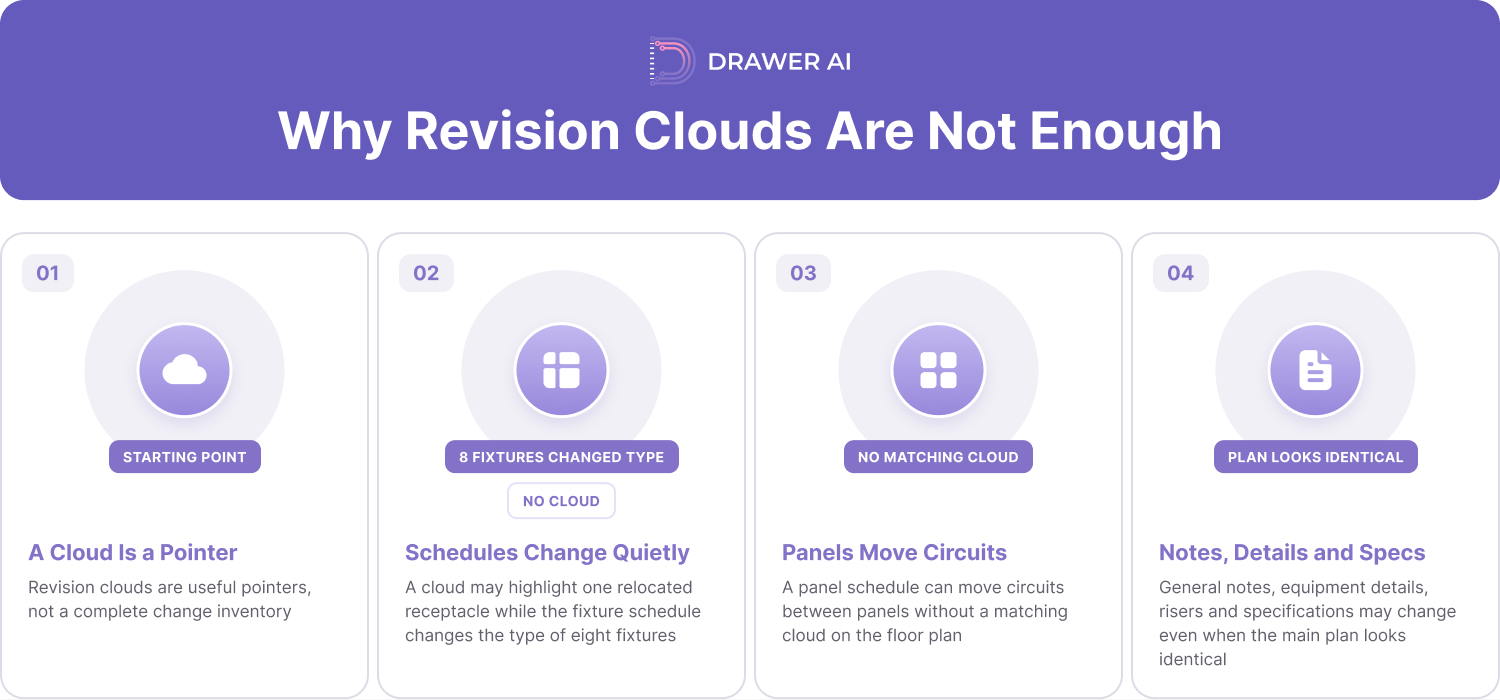
A reliable check pairs the graphic comparison with a table-by-table review of fixture schedules, panel schedules, one-lines, legends, keynote lists, and relevant specification changes. The reviewer should confirm what changed, what stayed the same, and which sheets are referenced by the new note.
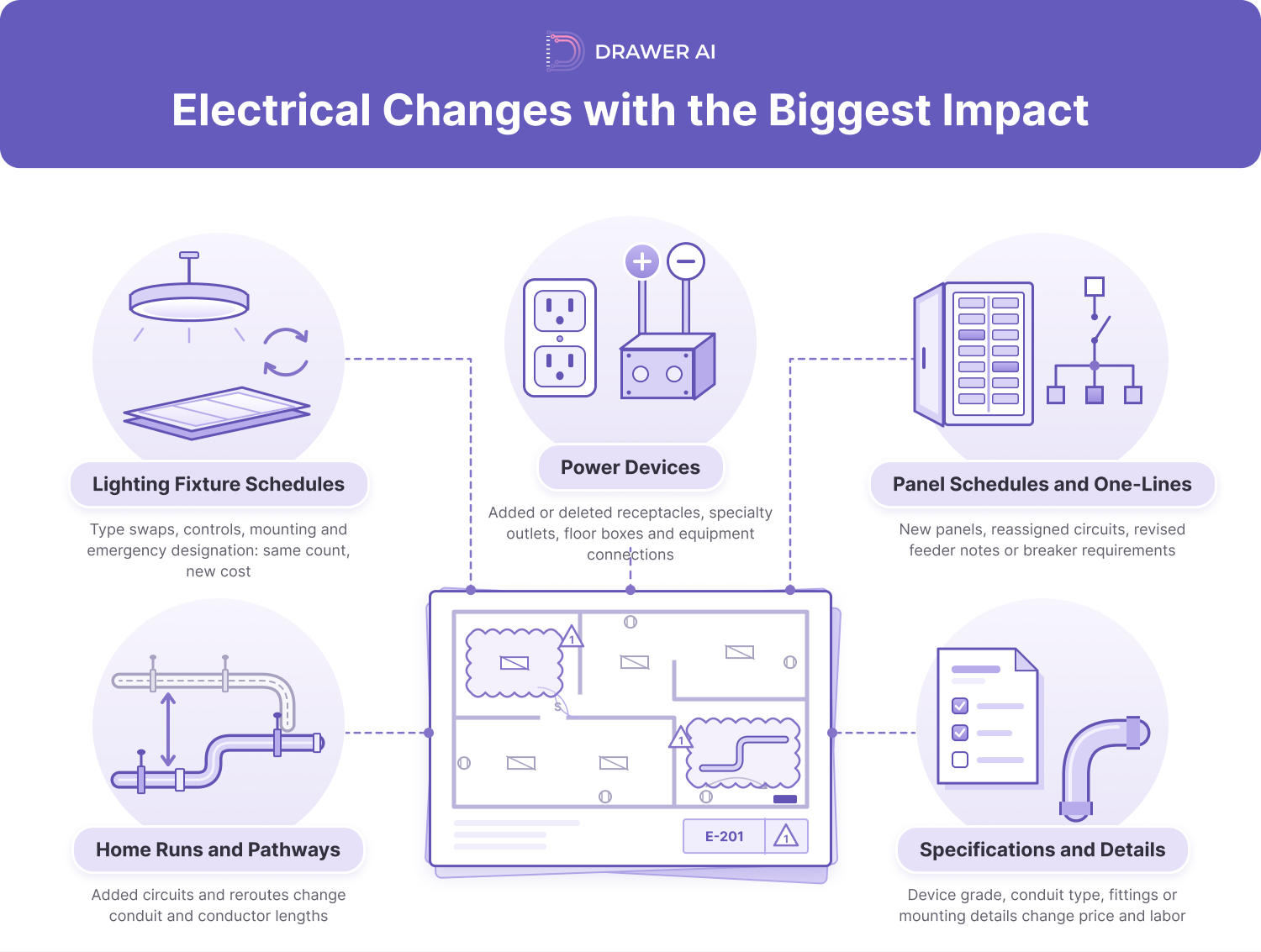
High-impact electrical change checklist: Focus first on changes that affect more than one line item. A moved device may change a box location and branch-circuit length; a fixture substitution may leave the fixture count unchanged but alter cost and installation requirements.
Use the same comparison sequence every time. It is more dependable than flipping between random PDFs or checking only sheets with visible clouds.
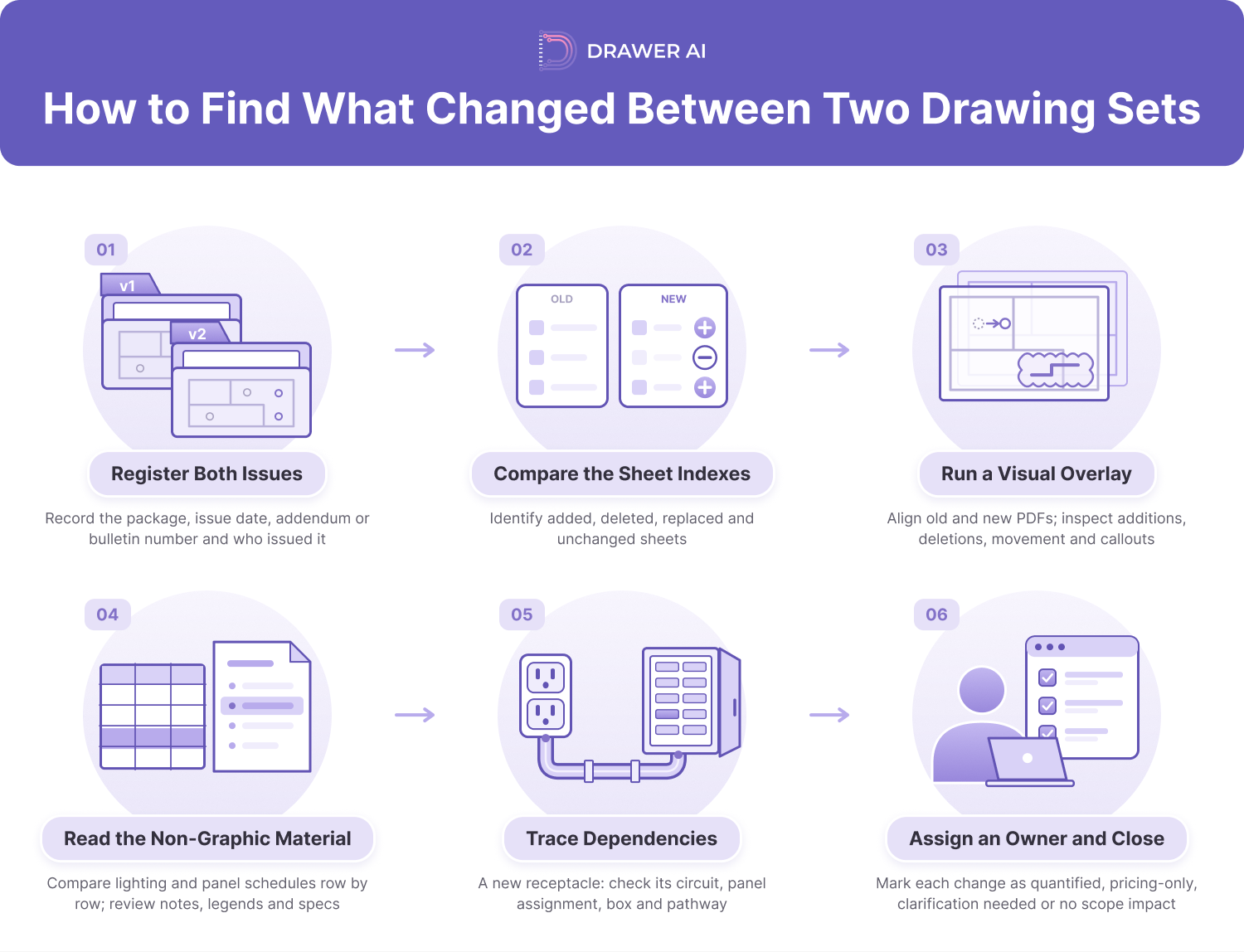
This procedure also improves handoffs. Someone who joins the bid later can see which package was compared, which assumptions remain open, and why the new quantities differ. For further checking discipline, see our guide to common PDF takeoff errors.
Separate the base quantity from the adjustment. Keep waste factors, allowances, unit prices, and labor extensions in their own fields. The simple relationship is: revised quantity = frozen baseline quantity + approved or tracked additions − deletions. Preserve separate rows for substitutions so a zero net device-count change cannot hide a material-price change.
Organize each line by area, system, device or assembly, and source sheet. A revision log needs at least a document ID, old and new sheet revision, description, baseline quantity, new quantity, signed quantity delta, unit, reviewer, status, and priced impact. If pricing is still pending, say so rather than silently treating it as zero.
Consider this illustrative office-floor bulletin. It replaces eight Type A fixtures with Type B fixtures, adds four duplex receptacles, and adds one home run. The takeoff log should show the following distinct quantity movements:
|
Scope item |
Old quantity |
Revised quantity |
Delta / pricing action |
|
Type A fixtures |
60 each |
52 each |
−8 each; remove Type A material and labor. |
|
Type B fixtures |
0 each |
8 each |
+8 each; price new type and installation. |
|
Duplex receptacles |
12 each |
16 each |
+4 each; include boxes and associated scope. |
|
Home runs |
3 runs |
4 runs |
+1 run; measure revised conduit and conductor lengths. |
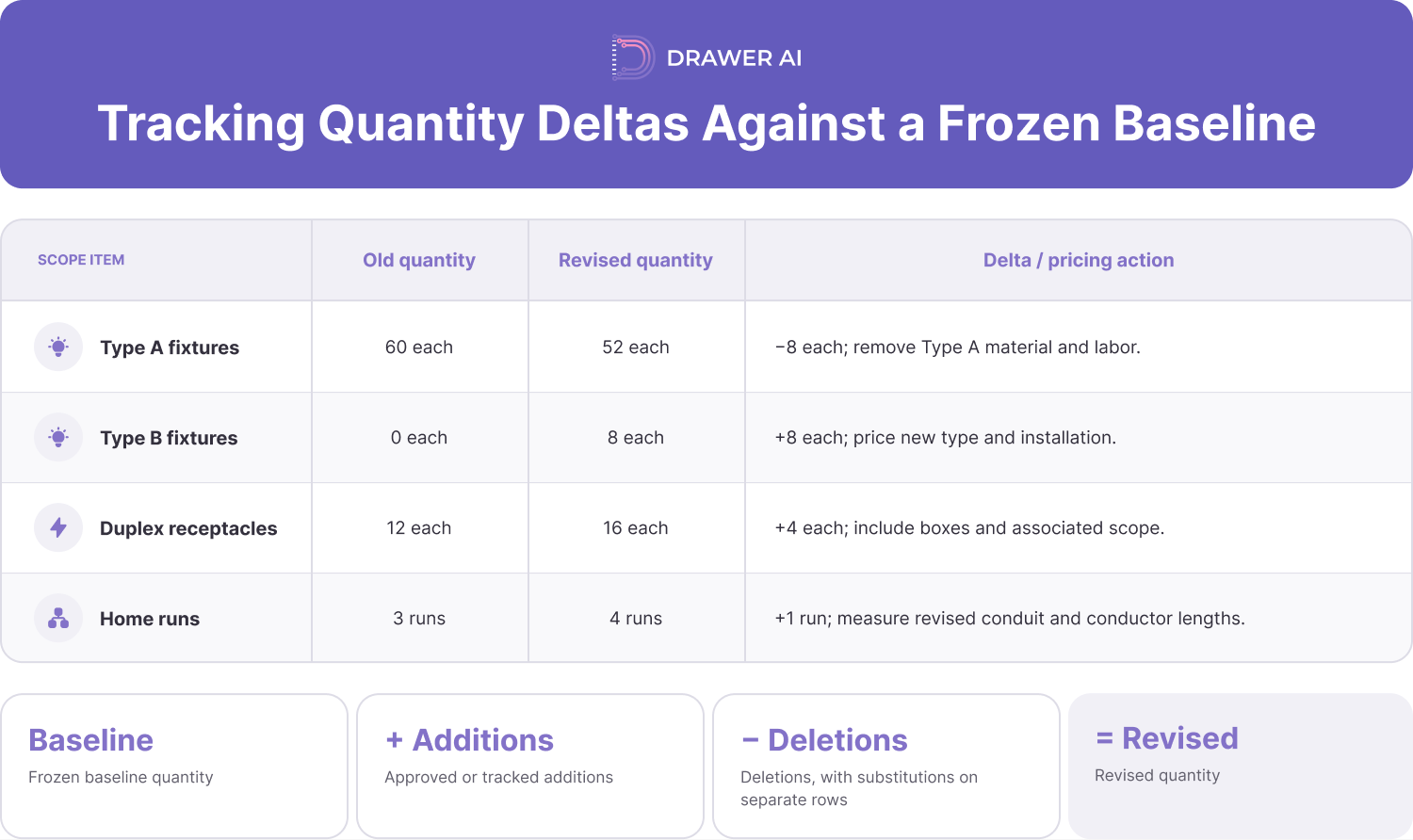
The total number of fixtures is still 60, but the fixture mix has changed. Reporting “zero fixture change” would miss the substitution. Similarly, the added home run is one count, not a fixed number of feet; it requires route and installation review. The numbers are illustrative; they don’t describe a particular project or a standard production rate.
Record quantity changes in the log, attach the old and new marked-up sheets, and push only affected quantities into the estimate. Keep the change separate in the recap so the chief estimator can distinguish scope growth, substitutions, and re-pricing. A dated, signed-off log prevents the same item being charged twice when two issuances overlap.
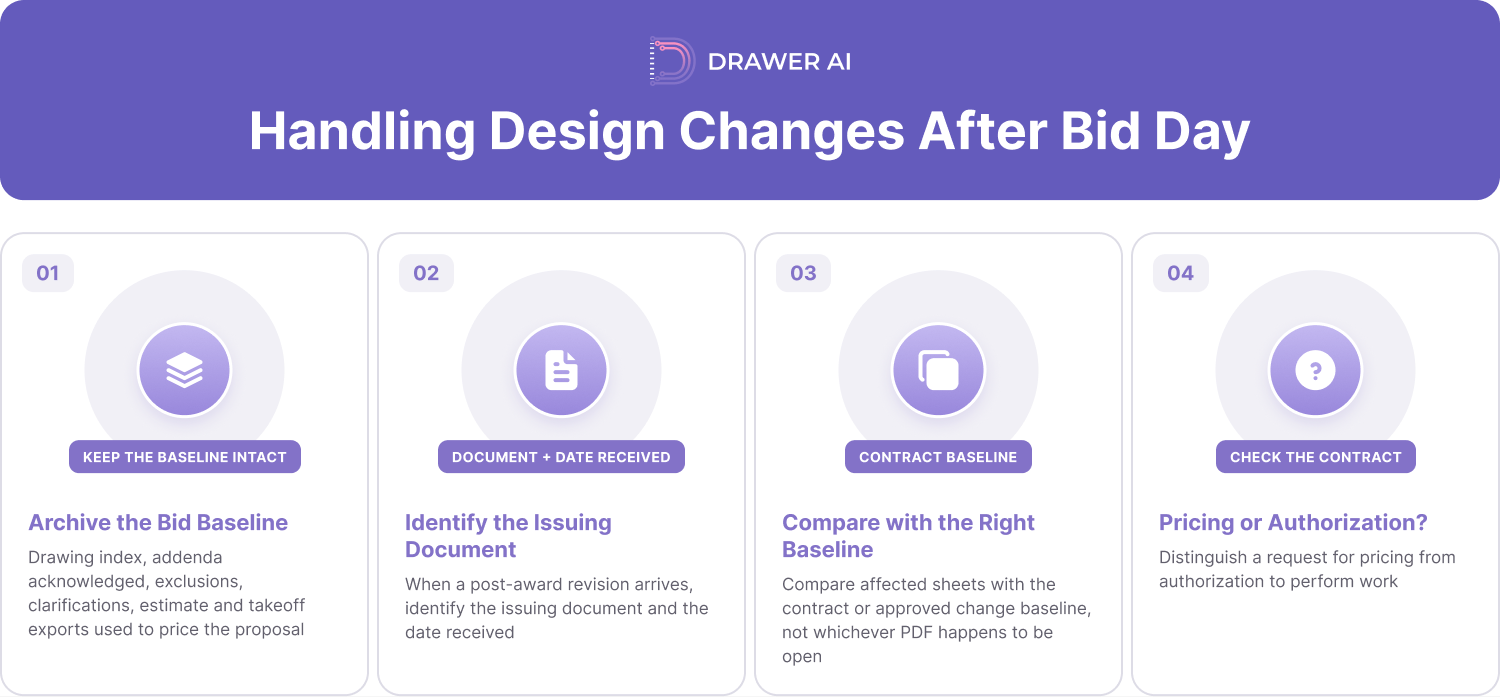
At bid submission, archive the exact drawing index, addenda acknowledged, exclusions, clarifications, estimate, and takeoff exports used to price the proposal. That is the baseline against which later scope movements can be explained. Do not silently replace that file with the latest construction set.
When a post-award revision arrives, identify the issuing document and date received. Compare the affected new sheets with the contract or approved change baseline, and avoid comparing against whichever PDF happens to be open. Record the added and deleted quantities, associated material and labor changes, supporting markups, and any unresolved direction. Distinguish a request for pricing from authorization to perform work.
A project manager may use that record to prepare a proposed change order or discuss a credit. Whether notice, approval, or time adjustments are required depends on the contract and the project’s procedures. Check those requirements promptly; an estimating log supports documentation but does not determine entitlement. As the AIA explains in its change-order overview, different instruments serve different contract-administration purposes.
Maintain a clear chain from the original bid quantity to each subsequent adjustment. If a later bulletin reverses an earlier addition, post the reversal against the correct change ID rather than subtracting it from an unexplained grand total.
Evaluate the revision workflow, not only the first-count speed. A useful tool or combination of tools should make it practical to compare drawing issues, find each counted item on a source sheet, review quantities by area or system, preserve prior versions, and export evidence. Ask vendors to demonstrate the process using an actual addendum containing both graphic changes and schedule-only changes.
Key questions are whether an overlay is available, whether quantities can be traced to source drawings, how prior issues are retained, what review controls are available, and how changes reach the pricing workbook. Treat these as evaluation criteria; not every takeoff platform includes all of them. The estimator must still verify the source package and determine the commercial significance of the change.
At Drawer AI, we detect power devices, lighting fixtures, and fire alarm devices on PDF drawings, read fixture and panel schedules, and route branch circuits and home runs. Our QA tools let estimators review and correct the detected results, and our outputs include Excel takeoff data and marked-up PDFs. Those exports can provide a dated record for each reviewed drawing issue. Keep the side-by-side revision comparison and the quantity-delta log as part of your team’s document-control process.
For a separate look at verification before pricing, read our automated electrical takeoff accuracy checks.
Before calling an electrical takeoff current, confirm five things: the latest issued sheet index matches the PDF set; revised schedules and notes were reviewed even where no cloud appears; every changed device, fixture, panel, and home run has been traced to related scope; the signed quantity deltas reconcile to the new totals; and the estimate reviewer knows which changes are priced, excluded, or awaiting clarification.

A revision process gives you more than a new total: it shows which document changed the scope, which electrical quantities moved, and what that means for the estimate. Drawing bulletins become manageable when old quantities are preserved, non-clouded changes are checked, and each adjustment has its own traceable record.
At Drawer AI, we help estimators create and review electrical takeoffs from PDF drawings, then export the quantities and marked-up plans for their estimating workflow. Book a Drawer AI demo to see how those reviewed outputs can support your team’s revision-control process.

14425 Falcon Head Blvd
Building E, Suite 100,
Austin, TX 78738
Created by Estimators, Powered by AI and Innovation
Copyright © 2026 Drawer AI. All rights reserved.