
AI




This guide explains the importance of specialized job management software for electrical contractors, highlighting how these tools address unique industry challenges such as complex coordination, compliance, and documentation needs.
Table of Сontents
Electrical contractors face unique challenges that require tailored solutions for managing jobs efficiently.
For example, in a commercial setting such as a hospital renovation, contractors must coordinate the installation of backup generators and emergency lighting systems without disrupting ongoing medical operations, necessitating precise scheduling and compliance with stringent healthcare regulations.
In an industrial scenario like upgrading electrical systems in a manufacturing plant, contractors must manage complex documentation for hazardous area certifications and ensure all work meets both OSHA and NFPA standards.
Specialized job management systems are essential for handling the complex coordination, compliance, and documentation requirements specific to electrical contracting, streamlining operations and helping contractors deliver projects on time and within budget.
Unlike generic construction or project management software, job management tools designed for electrical contractors offer features that address industry-specific needs. These tools provide enhanced support for electrical workflows, regulatory documentation, and task scheduling that go beyond the scope of standard project management platforms.
For example, electrical contractor job management software can automatically track and manage permit requirements for hazardous area installations, ensuring all compliance documentation is generated and stored correctly—a capability not typically found in generic project management suites.
In another scenario, when coordinating the installation of emergency backup systems in hospitals, specialized tools allow for precise scheduling of electrical shutdowns and real-time communication with field teams to minimize disruptions and maintain regulatory compliance. Generic platforms often lack the ability to handle such intricate workflow dependencies and documentation needs, underscoring the necessity for solutions tailored to the electrical contracting industry.
Electrical contractor job management software is a specialized digital platform designed to support the operational needs of electrical contracting businesses. It integrates essential functions into one system to help contractors manage their projects more efficiently.
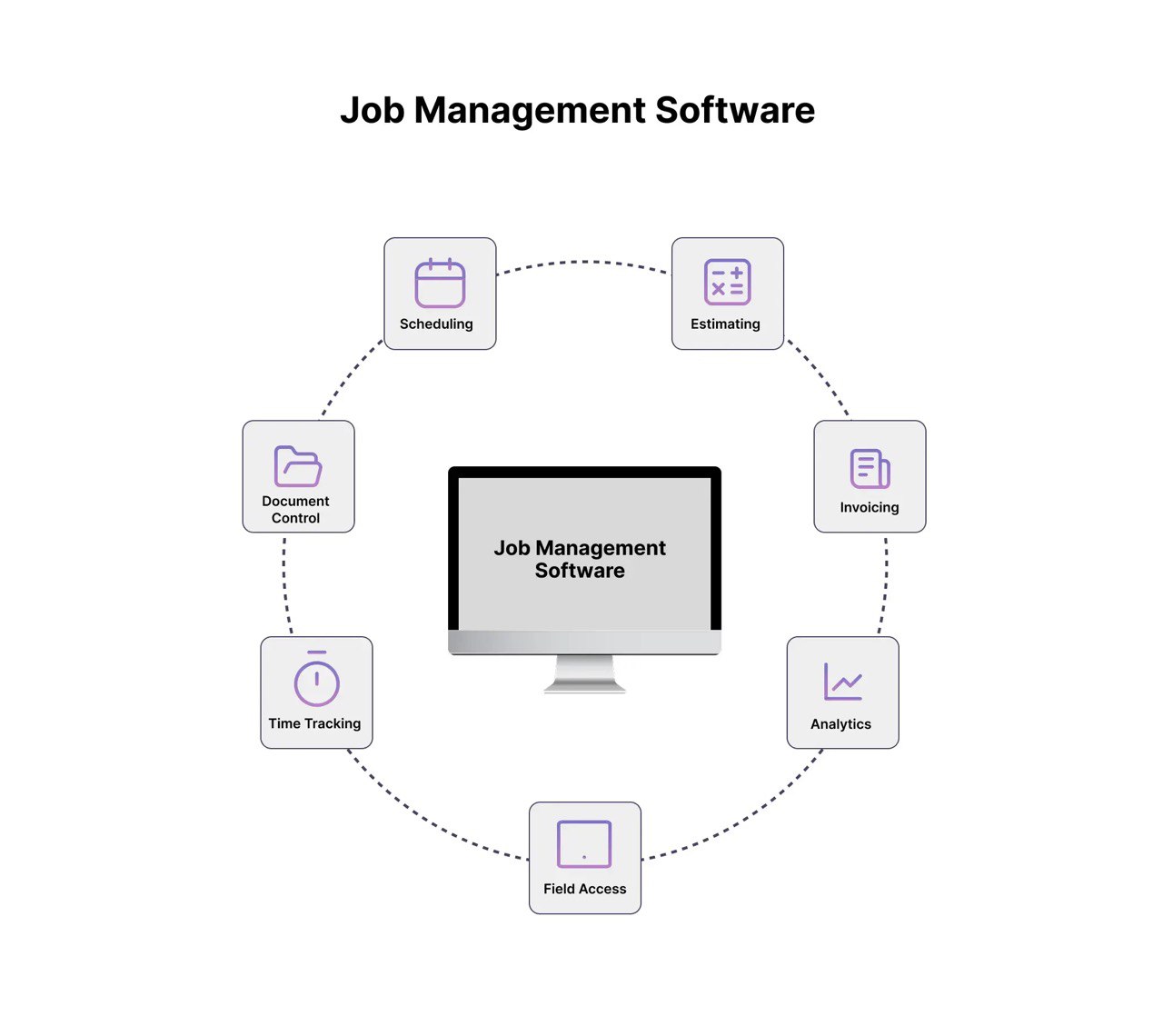
This software is specifically developed to meet the demands of commercial and industrial electrical contractors. It supports large-scale project management, ensures compliance with industry standards, and enhances collaboration among teams. By offering tailored functionalities, it helps contractors manage complex jobs, maintain accurate records, and improve overall efficiency.
By bringing these abilities together, the software makes it easier to coordinate projects, keeps compliance documents in one place, and gives field staff immediate access to essential information, helping to minimize delays and mistakes. Advanced analytics and estimating tools help contractors use resources wisely and keep their pricing competitive, while features like automated invoicing and time tracking make handling finances simpler. The customized functions are detailed below.
For example, in typical commercial and industrial use cases the software supports precise scheduling of crews and equipment, real-time inventory tracking to prevent material shortages, and automated logging of safety inspections for compliance. These integrated workflows ensure that each project phase is executed smoothly, compliance records are maintained, and any field issues are resolved rapidly, enabling contractors to meet rigorous deadlines and quality expectations.
When selecting job management software for commercial and industrial electrical contracting, it is important to consider a set of core features that will support efficient project execution and compliance management.
Effective scheduling tools allow contractors to organize and assign tasks with integrated calendars, ensuring all team members are aware of key dates and project milestones.
Automation in job costing provides immediate insight into expenses and budget adherence. Real-time project status updates help managers track progress and address issues promptly.
A centralized database for customers and jobs enables efficient tracking of project histories, communications, and client information, enhancing service quality and recordkeeping.
Secure document storage and compliance tracking tools allow contractors to digitally capture, upload, and organize a wide range of safety and regulatory forms, including Job Safety Analyses (JSAs), Safe Work Method Statements (SWMS), permits, test certificates, and inspection reports.
These tools ensure that all critical documentation are kept up to date, easily accessible, and properly archived for audit and compliance purposes. By digitizing these records, teams can quickly retrieve the necessary forms for regulatory reviews, client requests, and site inspections, supporting proactive safety management and efficient project execution.
Mobile-enabled tools support field staff by providing access to work orders, digital timecards, and asset tracking from any location, fostering real-time communication and operational flexibility.
Seamless integration with estimating, accounting, and design/takeoff platforms—such as Drawer AI, QuickBooks, or Xero—enables streamlined workflows, reduces duplication of effort, and improves overall project management efficiency.
Modern job management software bridges the gap between office and field teams by eliminating paperwork and reducing the need for manual calls or updates. This streamlined communication ensures that information flows quickly and accurately between all stakeholders.
The use of task checklists, automated documentation, and audit trails helps standardize procedures across projects. By following consistent processes, organizations can maintain quality and accountability throughout each stage of a job.
These platforms enable detailed tracking of actual costs versus budgeted amounts, providing real-time insights into profit margins. Managers can monitor financial performance as projects progress, allowing for timely adjustments and better budget control.
Job management software improves scheduling efficiency, helping teams coordinate tasks and resources more effectively. This leads to fewer project delays and keeps work moving according to planned timelines.
With integrated compliance and safety tools, organizations can better manage regulatory requirements and reduce risks. Automated tracking and documentation ensure that safety protocols are followed and that compliance records are up to date.
A successful rollout of job management software involves several key steps to ensure a smooth transition and effective adoption across the organization.

Begin by thoroughly assessing the organization’s specific needs and requirements. Evaluate different software solutions, comparing features and capabilities to identify the best fit for the team’s workflows and objectives.
Once a solution is selected, configure the software to align with established processes and project requirements. Engage team members early in the onboarding process to familiarize them with the platform and encourage buy-in.
Carefully migrate ongoing projects and relevant data into the new system. Ensure that data is accurate and clean during this process to maintain integrity and usability after migration.
Provide comprehensive training to both office and field staff so that all users understand how to utilize the software effectively. Clearly define and communicate usage policies to establish consistent practices and expectations across the organization.
Comprehensive software platforms often need a structured onboarding process, including training, user guides, and regular support. A phased rollout helps teams adjust gradually, manage challenges, and ensure everyone is successfully integrated.
In contrast, simpler job management tools feature easy-to-use interfaces and basic functions, making them quick to learn and implement. Teams can begin using these systems with minimal training, which speeds up adoption and enables faster access to automation and improved organization.
Regularly review software usage and processes to identify areas for improvement. Continually refine workflows and provide additional training as needed to maximize the value and efficiency gained from the job management platform.
Several leading job management software platforms are available for electrical contractors and organizations in 2025. The following profiles offer a brief overview of each platform, emphasizing their core strengths, suitability for commercial or industrial environments, and import
|
Product |
Best For |
Primary Focus |
Key Strengths |
|
simPRO |
Commercial & Industrial Contractors |
Project Management, Scheduling, Quoting |
Robust feature set, workflow integrations, connectivity to business tools |
|
ServiceTitan |
Commercial Field Service Businesses |
Field Service Management |
Comprehensive platform, strong operational efficiency, seamless team communication |
|
AroFlo |
Industrial & Varied Electrical Projects |
Flexible Job Management |
Integration with accounting and inventory, adaptable for different project types |
|
BigChange |
Commercial & Industrial Contractors |
All-in-One Job Management |
Paperless operations, real-time tracking, end-to-end workflow support |
|
Tradify |
Commercial & Small Industrial Teams |
Job, Quote, and Invoice Management |
User-friendly, fast implementation, efficient office-to-field data flow |
Drawer AI is an electrical estimating and digital takeoff tool that can complement job management platforms by automating the most time-consuming parts of the bidding process.
Artificial intelligence is reshaping the way electrical job management is approached. Key innovations include AI-powered scheduling, which automates the process of assigning jobs based on technician availability, skill sets, and location, leading to more efficient resource utilization. Intelligent dispatch systems further enhance responsiveness by dynamically routing teams to where they are most needed, minimizing downtime and travel costs.
Automated invoicing is another significant advancement, allowing businesses to quickly generate and send invoices with minimal manual intervention. This not only accelerates cash flow but also reduces administrative errors. Predictive workload balancing uses AI to anticipate future job demands and allocate resources accordingly, helping companies maintain optimal performance even during peak periods.
The future of electrician management software is closely linked to broader trends in industry digitalization. As digital tools become more sophisticated, these platforms will continue to streamline operations, reduce manual tasks, and support more data-driven decision-making throughout every stage of project management.
Investing in advanced job management solutions delivers measurable returns for electrical contractors. For example, contractors who adopted ServiceTitan reported a 25% reduction in project delays and a 30% increase in client satisfaction within just six months, while users of BigChange experienced up to 40% fewer administrative errors due to automated workflows. These platforms empower businesses to achieve higher productivity, reduce costly rework, and foster greater satisfaction among both clients and teams.
Modern job management platforms are no longer a luxury—they are essential for contractors who aspire to grow and remain competitive. The efficiencies gained from streamlined operations, automated processes, and improved accuracy lay a solid foundation for sustainable business growth. Case studies from companies using AroFlo and Tradify have shown improved operational efficiency and faster invoicing, translating directly to increased revenue and stronger client relationships.
Explore how the right job management solution can transform your business. Schedule a personalized demo, request pricing to see the benefits in action, or contact our team for a free consultation. You can also read our case studies to discover real-world results and learn how industry peers are leveraging these platforms for success.

14425 Falcon Head Blvd
Building E, Suite 100,
Austin, TX 78738
Created by Estimators, Powered by AI and Innovation
Copyright © 2026 Drawer AI. All rights reserved.